
iagobruno
Participant
April 22, 2020
Answered

Some icons are not showing correctly in the interface and in layers panel

  • April 22, 2020
  • 1 reply
  • 512 views

I recently installed XD on my notebook and noticed that some icons on the interface and on layers panel were missing or had been changed without explanation.

Look at the image below:
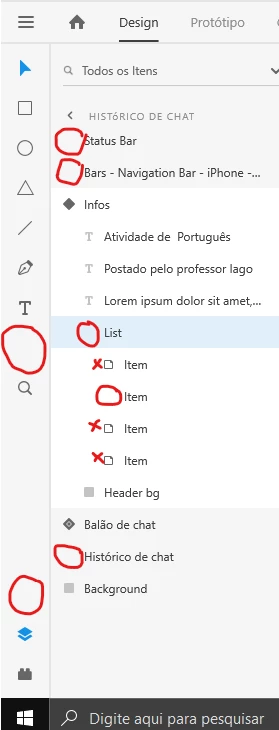
I'm able to use the program and interact with the layers normally but the lack of icons does not help to differentiate what is inside a group or not.


    This topic has been closed for replies.
    Correct answer Rishabh_Tiwari

    Hi there,


    Sorry to hear about the trouble. That's strange, as I do have Windows 10 and on my end, I can see those icons. Could you please quit Adobe XD and relaunch and check if you can see the icons. And if it still doesn't work, please try re-installing the application and let us know if that helps or if you need any further assistance.


    Regards

    Rishabh

    1 reply

    Rishabh_Tiwari
    Community Manager
    Rishabh_TiwariCommunity ManagerCorrect answer
    Community Manager
    April 22, 2020

    Hi there,


    Sorry to hear about the trouble. That's strange, as I do have Windows 10 and on my end, I can see those icons. Could you please quit Adobe XD and relaunch and check if you can see the icons. And if it still doesn't work, please try re-installing the application and let us know if that helps or if you need any further assistance.


    Regards

    Rishabh

    iagobruno
    iagobrunoAuthor
    Participant
    April 23, 2020

    The problem persisted for 3 days but was resolved by uninstalling and reinstalling again. I have no idea why. 🤔 🤔🤔 🤔


    Thanks anyway for helping me.

    Rishabh_Tiwari
    Community Manager
    Community Manager
    April 23, 2020

    Glad to hear it has been resolved! Feel free to reach out if you run into any other questions or issues in the future. Thanks!