


Participant
August 20, 2022
Answered

Starter Plan: Cant update Adobe XD anymore. Forces me to sign up to a plan

  • August 20, 2022
  • 4 replies
  • 1913 views

Hello everyone.

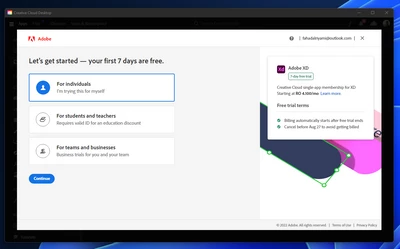
When I launched Creative Cloud Desktop today. I saw that there was an update to Adobe XD (v 54.0.12 available). When I tried to install it, it forces me to sign up to a paid plan. If I close this prompt, the update doesn't proceed.

So I am now stuck with an outdated version of XD even though I can use the software normally if I launch it directly from the Start Menu. It still bugs me to sign up for a paid plan, but I can simply close this prompt and continue to use the software as part of the Starter Plan. I just can't update it anymore.

How do I fix this?
 

    This topic has been closed for replies.
    Correct answer Atul_Saini

    Hi Fahdriyami,


    Thank you for reaching out. Your concern is genuine. However, there is nothing to worry, XD Starter plan remains available for people learning UI/UX design who have limited needs to share or collaborate with others. 

    The trial gives you the chance to try the full capabilities of XD at no cost for 7 days. There is no commitment; if you cancel during the trial period, you will return to the Starter plan. You can continue using XD Starter by launching XD manually (from Windows Start menu or macOS Dock/Launchpad).


    I hope this help. Please update this discussion if you need further assistance. 


    Thanks,

    Atul_Saini

    4 replies

    Participant
    December 7, 2022

    This company is an absolute joke.

    Been on starter plan for 1 year, always updating correctly, and suddenly this:


    rampandey
    Participant
    January 10, 2023

    It appears to me that this is a clear example of deception. They enticed us to sign up for their free plan, but now it seems they are taking advantage of the time we invested in learning the software. Let's switch to Figma and leave these fraudsters behind.

    giovannir96060239
    Participant
    August 4, 2023

    Adobe acquired Figma. 

    Participating Frequently
    September 19, 2022

    This update flow needs to be reverted or fixed. If there is a free version then I should be able to skip the trial and just update. 

    Participant
    September 12, 2022

    I have the exact same problem, and the so-called "correct answer" doesn't answer anything about the update problem. I only use the software to view XD files and I can't do so if the XD file happens to be made on a newer version of XD. If problems like this keep coming up, we're just going to switch to some other design software at that point.

    Inspiring
    September 19, 2022

    Hi I had the same problem. There were only two buttons on the main view in Creative Cloud. IIRC it was Purchase and Trial? 


    I noticed I was also out of date. So I went to the updates section of Creative Cloud. There was an option to update. After update the message did not appear at start of XD.

    Atul_Saini
    Community Manager
    Atul_SainiCommunity ManagerCorrect answer
    Community Manager
    August 20, 2022

    Hi Fahdriyami,


    Thank you for reaching out. Your concern is genuine. However, there is nothing to worry, XD Starter plan remains available for people learning UI/UX design who have limited needs to share or collaborate with others. 

    The trial gives you the chance to try the full capabilities of XD at no cost for 7 days. There is no commitment; if you cancel during the trial period, you will return to the Starter plan. You can continue using XD Starter by launching XD manually (from Windows Start menu or macOS Dock/Launchpad).


    I hope this help. Please update this discussion if you need further assistance. 


    Thanks,

    Atul_Saini

    Participant
    August 22, 2022

    This is a terrible implementation for the Starter Plan and raises security and privacy concerns.

    Basically Adobe just wants my credit card information. Why do I have to provide this info if I only intend on using the free Starter Plan?
