biscuitstudio
Participant
Mar 9, 2021 11:53 AM UTC
Answered

Strange artifacts in the app

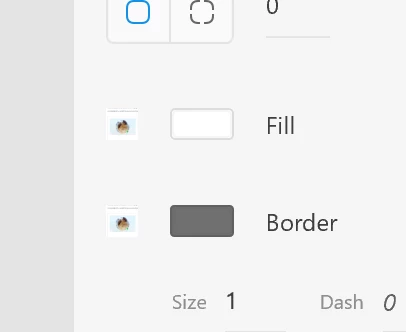
Hello. I am using the XD application. Unfortunately, sometimes such artifacts appear throughout the interface.

Is it the fault of the graphics card? Works on: Ryzen 2700X, 64GB ram, RX580, windows 10 (64bit)
 

This topic is closed to new replies. Start a new post to keep the conversation going.
monterxz
monterxzCorrect answer
Inspiring
Mar 9, 2021 1:05 PM UTC

This is not an issue with your hardware. Since launch Adobe XD would "replace" some of its UI assets with wrong ones if it's running for a long time. In my case dropdown arrows are usually replaced with some other icons. One time it even replaced its UI checkboxes with an image I've imported into XD to use in my design.


In such cases I don't pay attention and continue working. Restarting Adobe XD always fixes these issues.

4 replies

Harshika Verma
Community Manager
Community Manager
Mar 12, 2021 2:08 PM UTC

Hi there,


As Moterxz suggested, this type of issue always gets fixed after restarting the machine. If you are still facing the issue, please let us know. We will definitely try to work on it.


Thanks,

Harshika

Translate
biscuitstudio
Participant
Mar 17, 2021 9:58 AM UTC

Restarting the computer helps.

However, I noticed that this problem is not unique to Xd.
The MS Your Phone program also has such bugs.

Could it be a problem with some libraries in wndows or video card (drivers)?

Translate
Harshika Verma
Community Manager
Community Manager
Apr 5, 2021 12:30 AM UTC

Maybe, you can definitely visit your manufacturer's site to check for the latest update to your graphic card and see if that helps.


Thanks,

Harshika

Translate
monterxz
monterxzCorrect answer
Inspiring
Mar 9, 2021 1:05 PM UTC

This is not an issue with your hardware. Since launch Adobe XD would "replace" some of its UI assets with wrong ones if it's running for a long time. In my case dropdown arrows are usually replaced with some other icons. One time it even replaced its UI checkboxes with an image I've imported into XD to use in my design.


In such cases I don't pay attention and continue working. Restarting Adobe XD always fixes these issues.

Translate