This topic is closed to new replies. Start a new post to keep the conversation going.
Ares Hovhannesyan
Ares HovhannesyanCorrect answer
Community Expert
May 27, 2020

Here is part of SVG code of the cyrcle with shadow created in Adobe Illustrator


<?xml version="1.0" encoding="utf-8"?>
<!-- Generator: Adobe Illustrator 24.1.2, SVG Export Plug-In . SVG Version: 6.00 Build 0) -->
<svg version="1.1" id="Layer_1" xmlns="http://www.w3.org/2000/svg" xmlns:xlink="http://www.w3.org/1999/xlink" x="0px" y="0px"
viewBox="0 0 595.28 841.89" style="enable-background:new 0 0 595.28 841.89;" xml:space="preserve">
<style type="text/css">
.st0{fill:#FFF200;}
.st1{fill:none;stroke:#000000;stroke-miterlimit:10;}
</style>
<g>

<image style="overflow:visible;opacity:0.75;" width="1330" height="1384" xlink:href="data&colon;image/png;base64,iVBORw0KG...


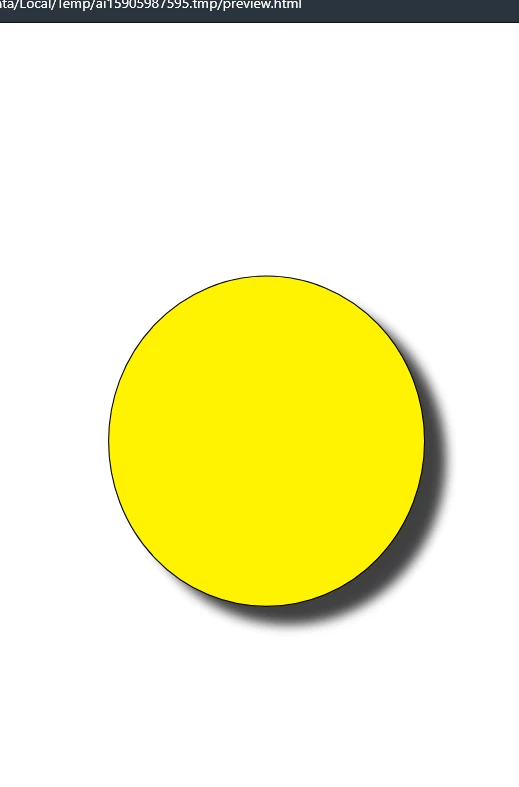
As you know vector graphics with shadow (or with any other style) effect created in Illustrator are raster effect. Here is the image preview from Illustrator. and it looks pixepixed
 

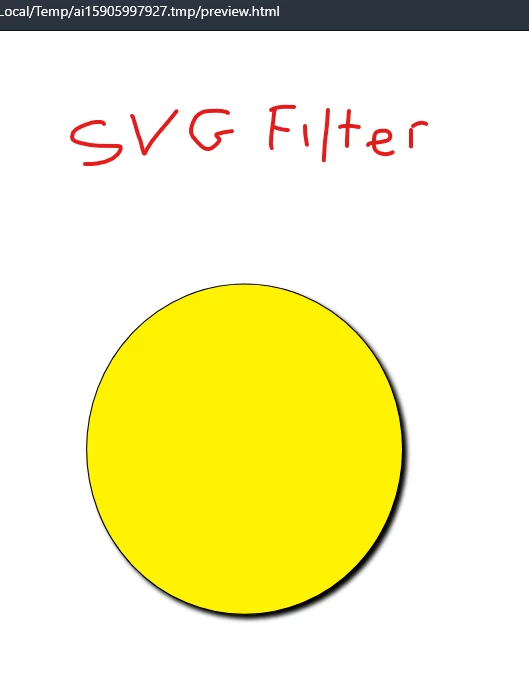
If you will use inIllustrator SVG filters that are located in 3d Effect and will apply SVG Shadow filter you will get this code


<?xml version="1.0" encoding="utf-8"?>
<!-- Generator: Adobe Illustrator 24.1.2, SVG Export Plug-In . SVG Version: 6.00 Build 0) -->
<svg version="1.1" id="Layer_1" xmlns="http://www.w3.org/2000/svg" xmlns:xlink="http://www.w3.org/1999/xlink" x="0px" y="0px"
viewBox="0 0 595.28 841.89" style="enable-background:new 0 0 595.28 841.89;" xml:space="preserve">
<style type="text/css">
.st0{filter:url(#AI_Shadow_1);}
.st1{fill:#FFF200;}
.st2{fill:none;stroke:#000000;stroke-miterlimit:10;}
</style>
<filter filterUnits="objectBoundingBox" id="AI_Shadow_1">
<feGaussianBlur in="SourceAlpha" result="blur" stdDeviation="2"></feGaussianBlur>
<feOffset dx="4" dy="4" in="blur" result="offsetBlurredAlpha"></feOffset>
<feMerge>
<feMergeNode in="offsetBlurredAlpha"></feMergeNode>
<feMergeNode in="SourceGraphic"></feMergeNode>
</feMerge>
</filter>
<g class="st0">
<ellipse class="st1" cx="281.77" cy="381.06" rx="143.94" ry="150.51"/>
<ellipse class="st2" cx="281.77" cy="381.06" rx="143.94" ry="150.51"/>
</g>
</svg>


As you can see here the shadow used svg language for parsing shadow. 


I think the reason is that Adobe XD do not use SVG filter when exporting SVG. But I am not shure...



4 replies

Ares Hovhannesyan
Community Expert
Community Expert
May 25, 2020

Here in SVG code I see that your logo elements has not be coded. Did you creat your logo in XD from scratch? Or it has been created in Ps or other app?

Translate
ivankebeles
Participant
May 25, 2020

Hi, but i talk about circle and dropshadow. Logo and text are ok. But when I made shape with dropshadow XD made it like a raster. Why?

Translate
Ares Hovhannesyan
Community Expert
Ares HovhannesyanCommunity ExpertCorrect answer
Community Expert
May 27, 2020

Here is part of SVG code of the cyrcle with shadow created in Adobe Illustrator


<?xml version="1.0" encoding="utf-8"?>
<!-- Generator: Adobe Illustrator 24.1.2, SVG Export Plug-In . SVG Version: 6.00 Build 0) -->
<svg version="1.1" id="Layer_1" xmlns="http://www.w3.org/2000/svg" xmlns:xlink="http://www.w3.org/1999/xlink" x="0px" y="0px"
viewBox="0 0 595.28 841.89" style="enable-background:new 0 0 595.28 841.89;" xml:space="preserve">
<style type="text/css">
.st0{fill:#FFF200;}
.st1{fill:none;stroke:#000000;stroke-miterlimit:10;}
</style>
<g>

<image style="overflow:visible;opacity:0.75;" width="1330" height="1384" xlink:href="data&colon;image/png;base64,iVBORw0KG...


As you know vector graphics with shadow (or with any other style) effect created in Illustrator are raster effect. Here is the image preview from Illustrator. and it looks pixepixed


If you will use inIllustrator SVG filters that are located in 3d Effect and will apply SVG Shadow filter you will get this code


<?xml version="1.0" encoding="utf-8"?>
<!-- Generator: Adobe Illustrator 24.1.2, SVG Export Plug-In . SVG Version: 6.00 Build 0) -->
<svg version="1.1" id="Layer_1" xmlns="http://www.w3.org/2000/svg" xmlns:xlink="http://www.w3.org/1999/xlink" x="0px" y="0px"
viewBox="0 0 595.28 841.89" style="enable-background:new 0 0 595.28 841.89;" xml:space="preserve">
<style type="text/css">
.st0{filter:url(#AI_Shadow_1);}
.st1{fill:#FFF200;}
.st2{fill:none;stroke:#000000;stroke-miterlimit:10;}
</style>
<filter filterUnits="objectBoundingBox" id="AI_Shadow_1">
<feGaussianBlur in="SourceAlpha" result="blur" stdDeviation="2"></feGaussianBlur>
<feOffset dx="4" dy="4" in="blur" result="offsetBlurredAlpha"></feOffset>
<feMerge>
<feMergeNode in="offsetBlurredAlpha"></feMergeNode>
<feMergeNode in="SourceGraphic"></feMergeNode>
</feMerge>
</filter>
<g class="st0">
<ellipse class="st1" cx="281.77" cy="381.06" rx="143.94" ry="150.51"/>
<ellipse class="st2" cx="281.77" cy="381.06" rx="143.94" ry="150.51"/>
</g>
</svg>


As you can see here the shadow used svg language for parsing shadow. 


I think the reason is that Adobe XD do not use SVG filter when exporting SVG. But I am not shure...



Translate