Participant
July 11, 2023
Question

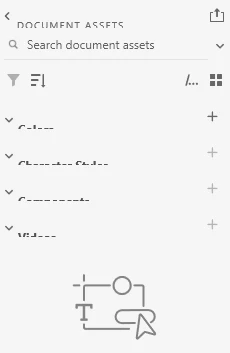
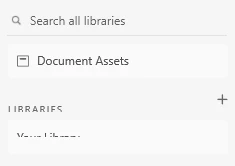
Text cut off in the Libraries / Document assets pane

  • July 11, 2023
  • 1 reply
  • 231 views

Libraries / Document assets pane. All the text is cut off. See the following images. It's the latest update version of XD, problem was there before the update. I've already tried uninstalling and reinstalling. 


Thanks for any help!
    This topic has been closed for replies.

    1 reply

    AkinGn
    Community Expert
    Community Expert
    July 11, 2023

    Hi @JesusMagraw, I've never had the problem but I use bigger text setting on my browser frequently so only reason that I can think of might be some bigger than default size of text etc setting on your operating system (still not sure but might be), could you please check those settings, whether you're using macOS or Windows, I'm going to paste the links that could help you to check those text size settings if you haven't: 


    macOS:

    https://support.apple.com/en-gb/guide/mac-help/mchld786f2cd/mac#:~:text=Make%20text%20bigger&text=Click%20the%20pop%2Dup%20menu,text%20size%20in%20Gallery%20view.


    Windows:

    https://support.microsoft.com/en-gb/windows/make-text-and-apps-bigger-c3095a80-6edd-4779-9282-623c4d721d64#:~:text=To%20go%20to%20the%20Accessibility,the%20text%20size%2C%20select%20Apply.


    Hope this helps!