


Participant
July 16, 2021
Question

the shadow of component disappeared after share

  • July 16, 2021
  • 3 replies
  • 436 views

https://xd.adobe.com/view/fac4e9a8-1379-41c4-a1de-ddf71fb8672c-af97/specs/


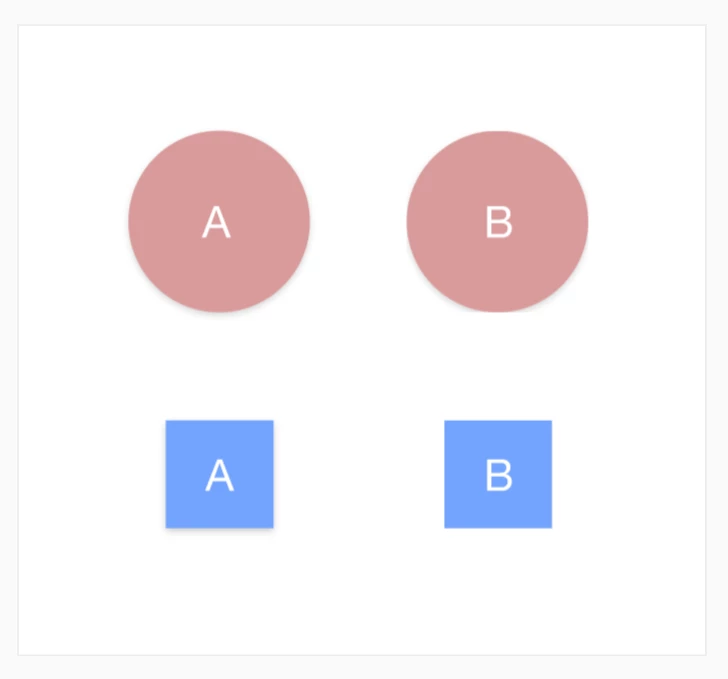
In my example, A is the same design as B, but after B was transformed to component and shared, the shadow below B is missing in browser view while the shawdow code still exists in CSS style. 

(for the circle one, the shadow at the bottom of B is trimmed and disappears.)
This topic has been closed for replies.

3 replies

Inspiring
July 16, 2021

Looks like it's fixed this morning. 


Participant
July 16, 2021

I can confirm and I'm experiencing the same problem!

Inspiring
July 16, 2021

I just started seeing the same thing today. All the box-shadows in my prototypes were suddenly cropped. As in your example, you can see the shadow anywhere there's a curve, but it gets cropped at the primary object's boundaries. That's really bad for corner-radius rectangles.


Within 24 hrs, this is already causing development issues for one of my teams. I had to walk them through ignoring the prototype and relying on the CSS in inspect mode (which is super finicky where component states are involved). To keep the project on track, I had to go back to manually pulling CSS values (which you can't do in the app!!!) and describing interactions with screen recordings. Back to the good ol' days.


This was the last straw for me. I've already convinced one client to jump from XD to Sketch. They're quite happy. I think it's time to move my one and only XD project (unfotunately a very big one I inherited) off this crippled platform. What a disappointment.