


MaxHaag
Participant
Oct 28, 2020 9:25 PM UTC
Question

The shared link on mobile is not showing 100%

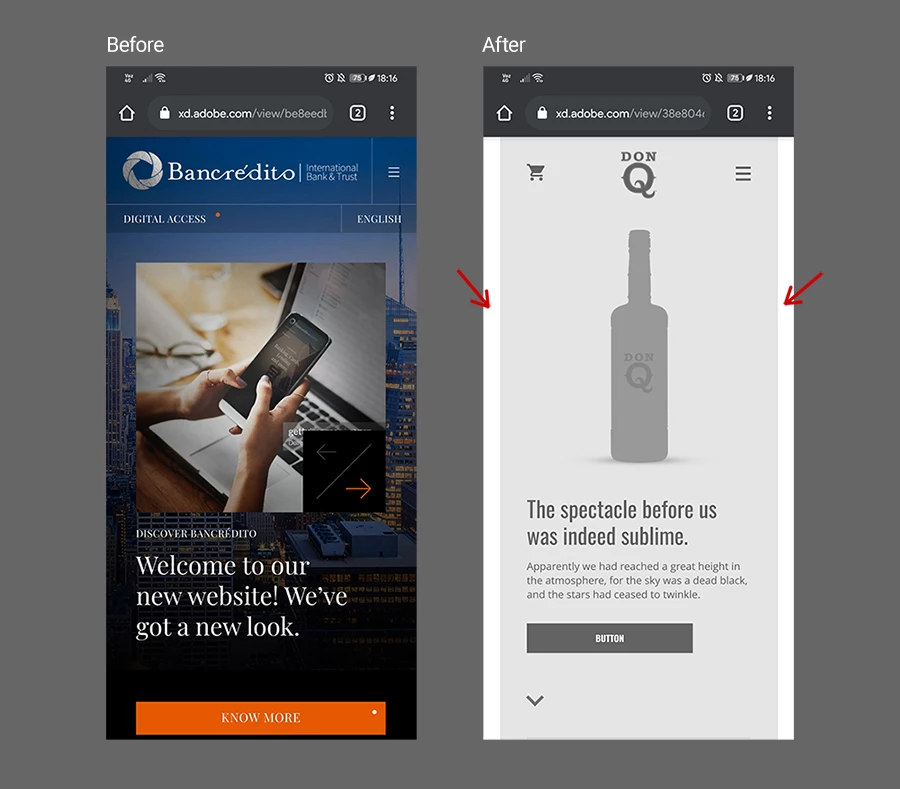
As long as I can remember the links shared on mobiles were shown 100%, some time ago this stopped being the case and now you can see white bars on the sides of the design. In conclusion, the design is not showing 100% of the device. Any solution? Attached as it looked before and as it looks now. The size of the artboards is exactly the same.
This topic is closed to new replies. Start a new post to keep the conversation going.

4 replies

Harshika Verma
Community Manager
Community Manager
Oct 28, 2020 9:43 PM UTC

Hi there,


Thank you for reaching out and sorry to hear that you're experiencing issue while viewing the design in mobile browser? Does that happen with every file or with a specific file? Have you tried viewing it in different broswer? Please share the link with us so that we can check at our end.


We will try our best to investigate on the issue.


Thanks,

Harshika

Translate
MaxHaag
MaxHaagAuthor
Participant
Oct 29, 2020 1:01 PM UTC

Thanks for answering. Here I leave the link. I see it the same in all browsers on both iOS and Android.


https://xd.adobe.com/view/38e80465-664a-48af-b22e-115c4691cf58-6dbb/?fullscreen


Thanks!

Translate
Harshika Verma
Community Manager
Community Manager
Nov 9, 2020 5:53 PM UTC

Thanks for sharing the link. Could you please share the screenshot of your artboard properties of your design?


We will try our best to help.


Thanks,

Harshika

Translate