Participant
Aug 10, 2020 9:53 AM UTC
Answered

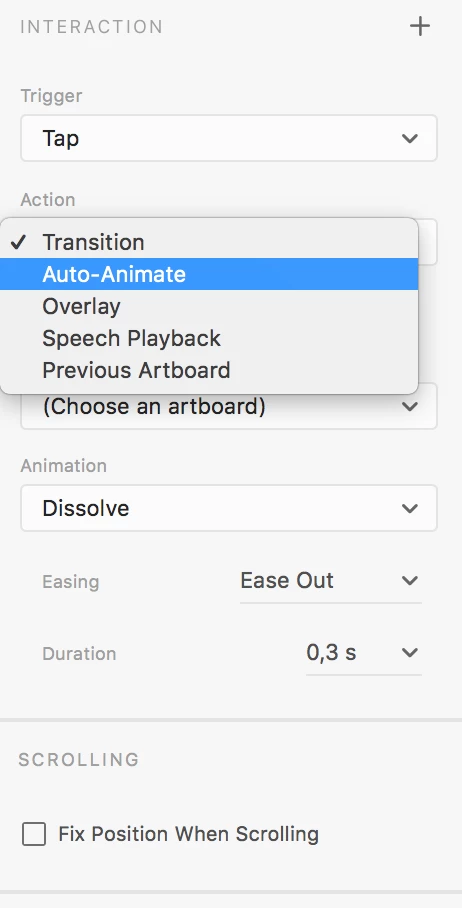
There is no scroll in the action section

I am attempting to create anchor links in adobe Xd but when I switch to prototype, I don't see scroll to in the action type section. 
    This topic is closed to new replies. Start a new post to keep the conversation going.
    Kenneth Kawamoto
    Kenneth KawamotoCorrect answer
    Community Expert
    Aug 10, 2020 10:28 AM UTC

    Make sure you select an element/layer (not an artboard) else you won't see the "Scroll To" action type. Also your version of XD my not be the current one?

    3 replies

    Kenneth Kawamoto
    Community Expert
    Kenneth KawamotoCommunity ExpertCorrect answer
    Community Expert
    Aug 10, 2020 10:28 AM UTC

    Make sure you select an element/layer (not an artboard) else you won't see the "Scroll To" action type. Also your version of XD my not be the current one?

    Translate
    Jasmine33Author
    Participant
    Aug 10, 2020 11:14 AM UTC

    Thank you so much for the reply!
    I downloaded the latest version and it worked out.

    Translate
    Harshika Verma
    Community Manager
    Community Manager
    Aug 10, 2020 10:21 PM UTC

    Awesome. Glad to hear your issue has been resolved. Please feel free to reach out to us in the future for any query related to XD.


    We would be happy to help.


    Thank you, Ken for sharing your expert advice on this post. 


    Thanks,

    Harshika

    Translate