Participant
April 26, 2022
Answered

"This was saved with a newer version of Adobe XD." No new XD update available.

  • April 26, 2022
  • 2 replies
  • 1593 views

Some members of our team are getting this error and can no longer open shared cloud XD files. "This was saved with a newer version of Adobe XD. Please update Adobe XD to open it."


No updated is available. We've tried using the cleaner tool. Logging out. Reinstalling XD, Creative Cloud,  etc... We've turned on and off auto updates.  Nothing seems to solve the problem.


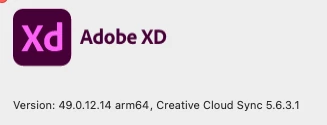
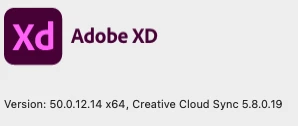
We are all on macs. Some with intel and others with m1 chips. Some of us have XD Version 50.0.12.14 and others have 49.0.12.14. See screen grabs below.


This issues is a major roadblock to us collaborating and getting work done.


Thanks

Hans
 

This topic has been closed for replies.
Correct answer hsundquist

SOLVED - My admin had checked that box that suppressed updates until every 30 days.

2 replies

hsundquistAuthorCorrect answer
Participant
April 28, 2022

SOLVED - My admin had checked that box that suppressed updates until every 30 days.

HARSHIKA_VERMA
Community Manager
Community Manager
April 26, 2022

Hi there, 


We are sorry for the trouble. We would request you to please try the below steps-


Feel free to update the discussion if your need further assistance.


We would be happy to help.


Thanks,

Harshika

Community Manager
April 27, 2022

Hi There,

Thank you for conacting us, In addition to Harshika's reply , I would like to add some points over here,

1. If the owner is in Higher version (say 50) of XD and inviting the collaborator who is in lower version ( Say XD 49) then this dailogue will poup up " This was saved with a newer version of Adobe XD" 


2. In order to collaborate - both owner and collaborator should be in same version of XD( say both user in XD 50 only)

3. Another way is collaborator should get update to higher version
Xd 50.


Regards,

Ashwini


Participant
April 27, 2022

Here's the scenario. I created the cloud XD doc. I'm on version 49. A colleague with version 50 opens the shared cloud doc succesfully. Now I can no longer open the cloud file. I also can't update to version 50 because there are no updates available. even after doing all of the recommended steps to find the latest update.


My guess is that if my colleage downgrades to version 49, he will also no longer be able to open said file.


Why not offer options for updating to a specific version so teams can all be on the same version? We have a large team (80+ licenses). Adobe need to fix this ASAP. It's been 3 weeks now. Can't you just send us an installer file for version 50?