
henryyjjames
New Participant
December 29, 2016
Question

Top menu bar with options ('File', 'Edit' and 'Object') are missing in XD on windows.

  • December 29, 2016
  • 45 replies
  • 87561 views

Hi,

I recently became very interested in Adobe Xd and I just discovered this problem. Mine does not have the bar at the top of the page with the File, Edit, Object View, etc.... This is annoying and is very hard to work without. It is also hard to work with tutorials on projects. I noticed this in a youtube video on how to do something. Here is a screenshot from my computer:
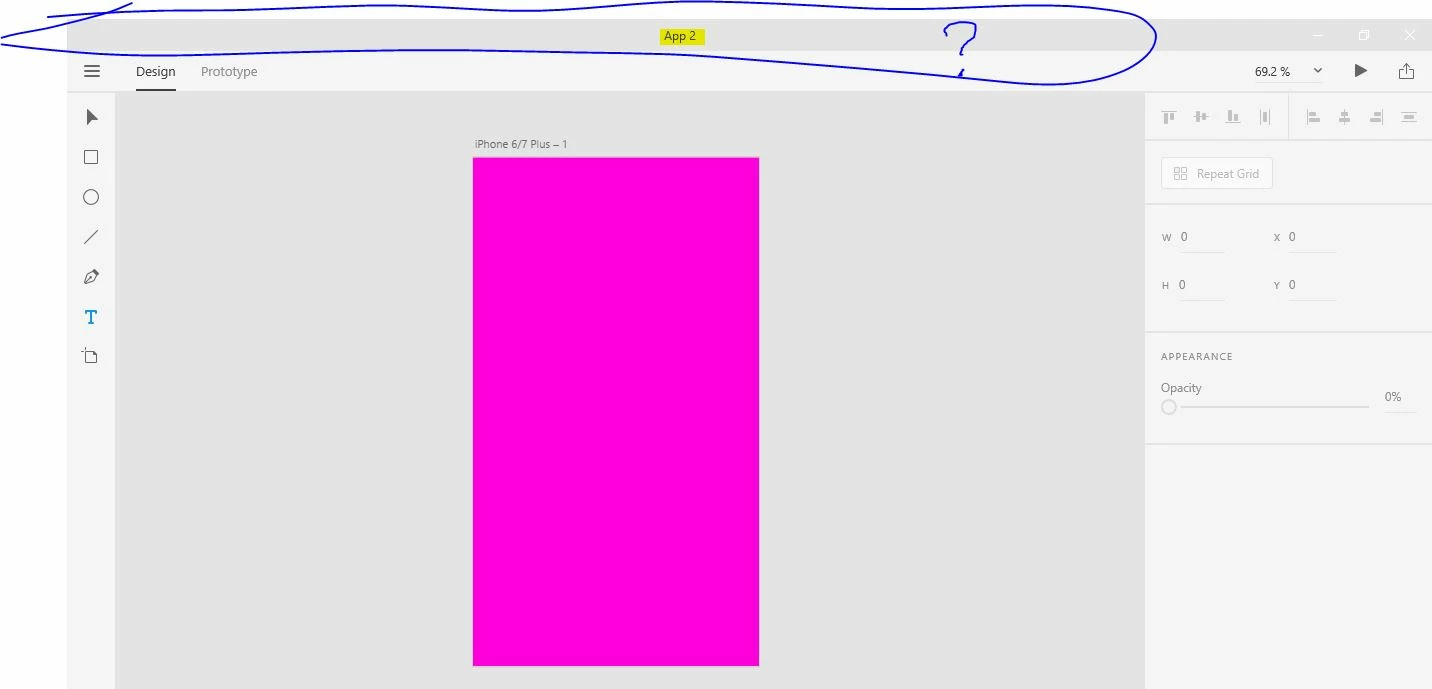
Here is a screen capture fro youtube:
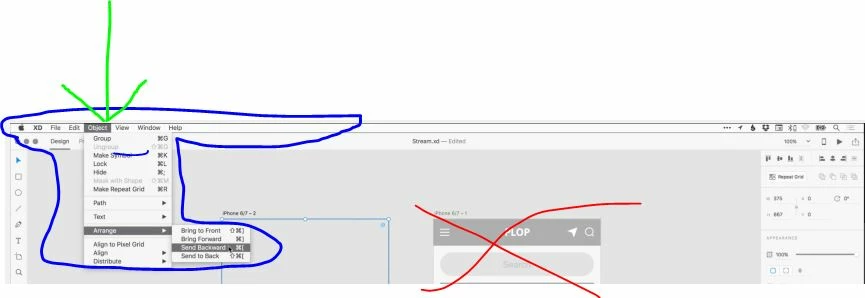
I don't know if this has to do with it being in Beta stage or windows vs. mac, but this is highly annoying.


Thanks,

H.


<The Title was renamed by moderator>

This topic has been closed for replies.

45 replies

New Participant
October 5, 2020

following microsoft for design ideas? That's rich! Wasn't it one of them who came up with comic sans.  Just saying. Microsoft has not shined brightly since their beginnings.  Most of Windows is awful built on awful.  Layers upon layers. adobe should just stick to their own thing

New Participant
September 10, 2020

Neither the pen or touch are particularly accessible to those with physical impairments - I NEED a menu bar.

New Participant
August 30, 2020

Five years and this STILL hasn't been fixed? Not all windows users are interested in getting fingerprints all over their screen to use basic features. 

New Participant
August 28, 2020

i can't find the "edit, print, file, object, plugin..etc" in the burger menu

HARSHIKA_VERMA
Community Manager
Community Manager
August 29, 2020

Hi Olamide,


We apologize for the frustration. We had a discussion in past regarding this. I would request you to please check the correct answer to this post where Elaine has provided the details about the menu bar.


Hope it helps.


Thanks,

Harshika


New Participant
August 13, 2020

Office still has a top menu bar, in 2020.

Why should I have to click twice to access a menu item, when I could click once?

There is plenty of real-estate at the top that is not being used...

New Participant
August 4, 2020

So where is objects cant find that option omg

New Participant
July 2, 2020

You've wasted your time, XD became useless on WIN... In hamburger menu missed a lot of function. I was very excited to learn new software, now I'm very disappointed... looking for something better than this.


New Participant
June 23, 2020

it is the middle of 2020 and you still couldn't add the top menu bar???? shame

New Participant
June 3, 2020

THIS PROGRAM IS ALMOST IMPOSSIBLE TO USE ON PC NOW. Adobe, seriously? Ever heard the phrase if it ain't broke then don't fix it? All of your programs have a very similar menu bar layout which makes jumping between the different programs seamless and intuitive. This is by far the worst UI change in any program I have ever seen. Did you guys even bother doing any user testing? I can understand you guys wanting to implement support for Windows UWP experience but to completely jump ship and only have that one layout is just ridiculous. Just because Microsoft has a silly idea (which I imagine will also cause them nothing but grief from their users) to remove the menu bar doesn't mean you guys should too. Hand on my heart if you ever thought about removing the menu bar from Photoshop or Illustrator I'd be canceling my subscription. 


Has anybody figured out where 'edit' and 'object' are? As I have no idea what is going on here. Your 1 place for everything hamburger menu is absolutely useless. Whoever's brain wave this was at Adobe should hang their head in shame. Please provide an option to revert back to a usable, normal, consistent layout. 


Thanks 

Barry


gustavog
New Participant
June 8, 2020

Well, oddly enough, the hamburger menu contains New Open, Save, etc., ONLY when you start a new design, or when you open something, being by double clicking on a XD file, link, or such.


So, to open a file on your computer, you first have to start a new design, just to access that elusive hamburger menu.


New Participant
May 31, 2020

WHY CANT U MAKE 2 DIFFERENT VERSIONS/KEEP ALLOW 2 OPTIONS WITH MENU & TOUCH FRIENDLY. WHY IN THE NAME OF TOUCH FRIENDLY U R ABANDONING/UNFRIENDING UR TRADITIONAL USERS. IF THERE WAS A DAY & AGE WHERE ALL DEVICES WERE INITIALLY TOUCH FRIENDLY, THEN U MIGHT HAVE ADDED THE MENU BAR TO MAKE IT MORE ACCESSIBLE TO TRADITIONAL USERS TO MAKE IT MORE USER FRIENDLY. CHANGE TAKES TIME, U NEED TO BE ABLE TO TRANSITION TO IT RATHER THAN ABRUPTLY DISALLOW SOMETHING WHERE THE WORLD HAS SO MANY MOUSE USERS EVEN WHEN WITH TOUCH. SO THE BEST COULD BE TO KEEP BOTH, ITS NOT ASKING FOR SOMETHING NEW RATHER USING THE PAST ONE SO IT MUSTNT BE DIFFICULT TO KEEP BOTH OPTIONS PROBABLY IN DIFFERENT WORK MODES LIKE e.g. Essentials Classic