Participant
January 9, 2023
Answered

Translate Adobe web page

  • January 9, 2023
  • 2 replies
  • 455 views

How to translate an adobe webpage?

    This topic has been closed for replies.
    Correct answer HARSHIKA_VERMA

    Hi @Maria Jose27861569rzsx,


    Thank you for reaching out. In addition to what our expert has said, I wanted to confirm if you are talking about translating the adobe.com page. If yes, you can right-click on the page and use "Translate to English" or any other language.
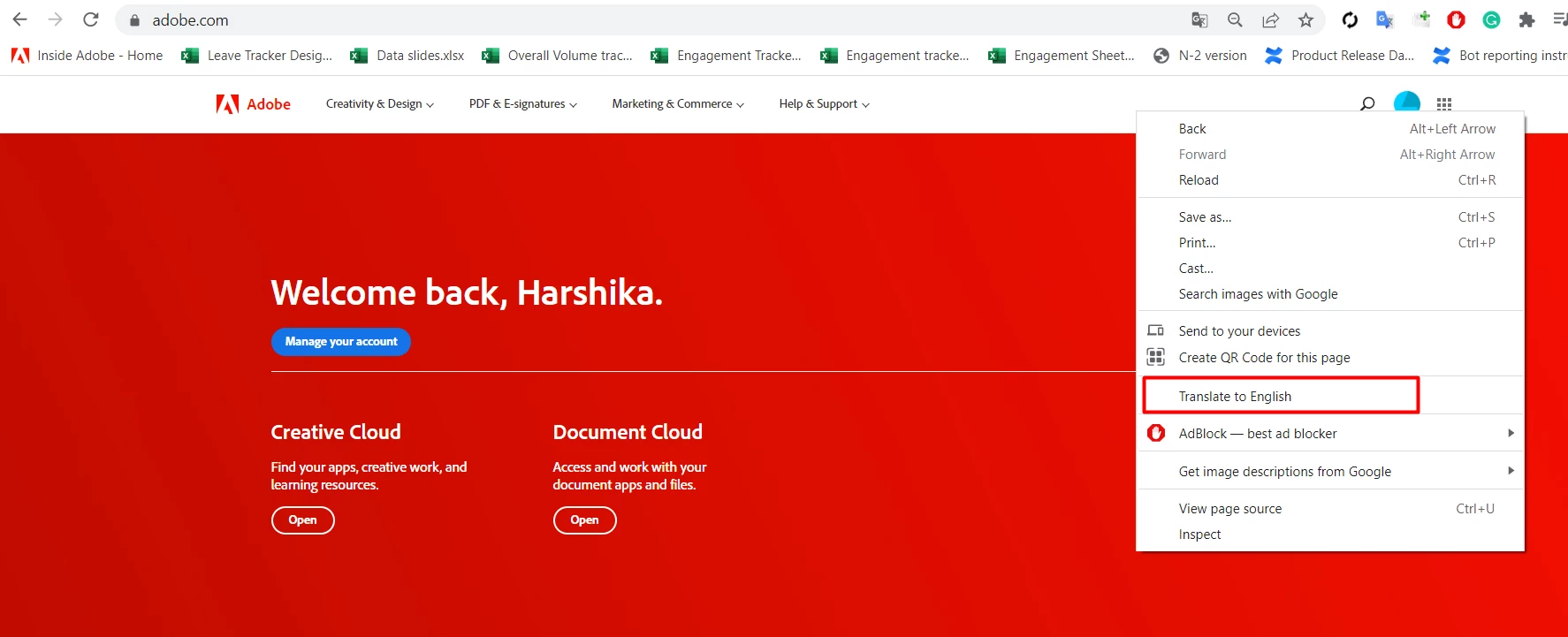


    Let us know if that's what you're looking for. We will try our best to help


    Thanks,

    Harshika

    2 replies

    HARSHIKA_VERMA
    Community Manager
    HARSHIKA_VERMACommunity ManagerCorrect answer
    Community Manager
    January 9, 2023

    Hi @Maria Jose27861569rzsx,


    Thank you for reaching out. In addition to what our expert has said, I wanted to confirm if you are talking about translating the adobe.com page. If yes, you can right-click on the page and use "Translate to English" or any other language.


    Let us know if that's what you're looking for. We will try our best to help


    Thanks,

    Harshika

    AkinGn
    Community Expert
    Community Expert
    January 9, 2023

    Hi @Maria Jose27861569rzsx, if you mean if there's a translation plugin for XD, although I've never used, this page has something about it https://support.crowdin.com/adobe-xd-plugin/ Let me know if it's not what you meant 🙂
