
Participant
January 25, 2017
Answered

Typekit and saving errors on Windows 10

  • January 25, 2017
  • 1 reply
  • 557 views

Hi,

I have built out an XD project in one file on my home laptop running windows 10. The file uses fonts from Typekit. I then downloaded XD to my 2nd laptop to allow me to work on this project from a different location. My XD file is in the cloud allowing me to work on it from this 2nd laptop. However, when I open it, I cannot save it once a single amend is made to the file. It also doesn't not render the typekit fonts - even when they are selected, it will serve the Segoe font, sometimes it will even crash when I try and change the font to a system font.

When I open a blank project from this 2nd laptop, and make some additions to the file, I can save this fine. However, I have the same Typekit problems as before, it will not render them even though they are selectable as an option, and once selected, after 5 seconds will crash XD.

I completely uninstalled the typekit fonts, signed out of Creative Cloud, uninstalled, restarted, reinstalled, restarted, reinstalled XD, reinstalled Typekits.... but same thing happens.

Has anyone else experienced this XD bug and / or have any advice please?

Note, the typekit fonts work fine in Illustrator / Indesign / Muse etc.

Many thanks

Steve
    This topic has been closed for replies.
    Correct answer fratila_vlad

    Hi Stuart,

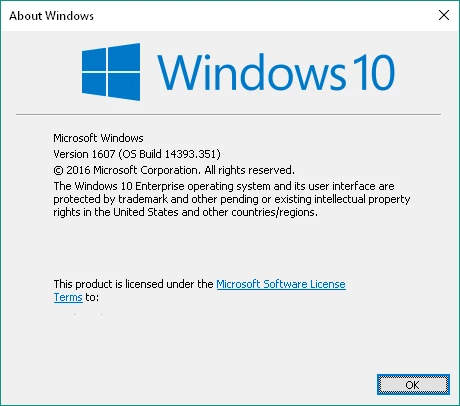
    Can you please run winver (click Start -> write winver -> press Enter) on the 2 machines and check OS Build?

    There was a bug in Windows10 with TypeKit fonts that has been fixed since 14393.351.

    My guess is that you have an older version on the 2nd laptop, the one that is causing problems. If so, can you please try to update Windows and check if you still have the problem?

    Thanks,

    Vlad

    1 reply

    fratila_vlad
    fratila_vladCorrect answer
    Participating Frequently
    January 25, 2017

    Hi Stuart,

    Can you please run winver (click Start -> write winver -> press Enter) on the 2 machines and check OS Build?

    There was a bug in Windows10 with TypeKit fonts that has been fixed since 14393.351.

    My guess is that you have an older version on the 2nd laptop, the one that is causing problems. If so, can you please try to update Windows and check if you still have the problem?

    Thanks,

    Vlad

    sstuart48Author
    Participant
    January 25, 2017

    Hi Vlad,

    Yes you are absolutely right. The 2nd laptop have 14393.0 version, I have just updated it and all is now working correctly.

    Many thanks, keep up the great work.

    Regards

    Steve