
Participant
April 5, 2017
Answered

Unable to change transition from dissolve

  • April 5, 2017
  • 9 replies
  • 29660 views

Hi there,

I recently updated Experience Design to 0.6.20.7 and now some of my screen transitions have a "dissolve" effect even when I have different settings. I have been trying to set them to slide left or slide right without any luck. I have also tried closing Xd and reopening, delete the transitions and reapplying them, and rebuilding the screens.

It seems like any screens I try to modify after the update lose their ability to change the transition.

Any ideas?
Correct answer bjartis87959146

Hi everyone.

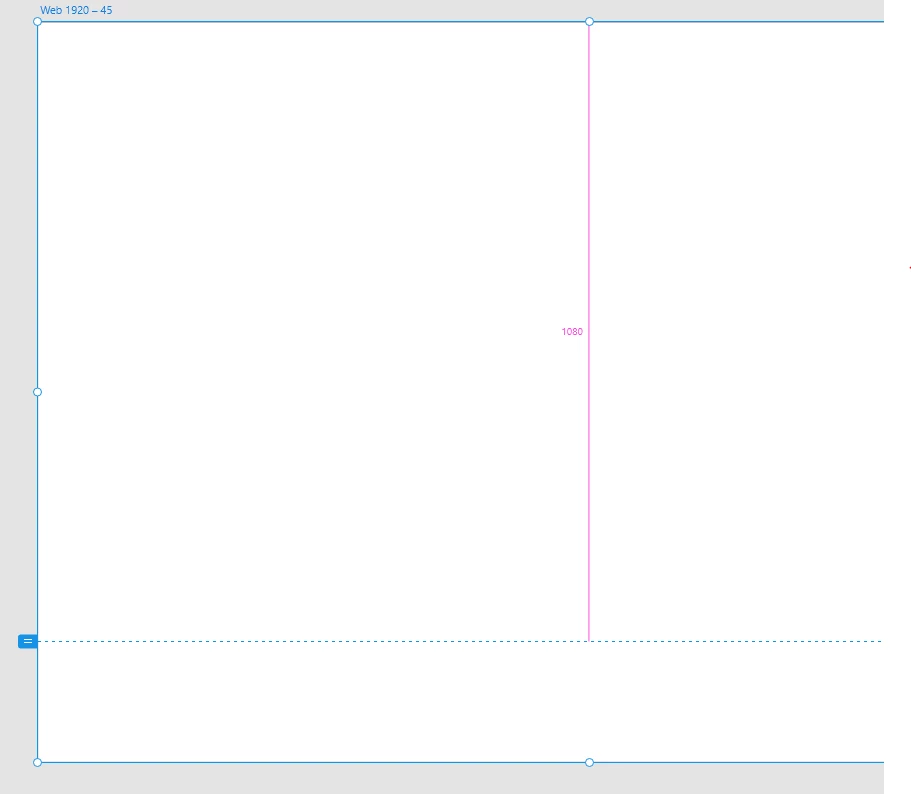
If you are unable to change transition from anything but "Desolve" it is not because the board sizes are different, but rather because the "blue line" is placed at different heights. The blue line appears at "the fold" when you click the artboard. It controls the view size when you preview your boards.

- Check if the blue lines are set at the same height for the two boards
- If not, change to same height
- You should now be able to choose between all transition types.

Hope it helps!

9 replies

Participant
May 28, 2021

This problem needs to be addressed by Adobe. Make it easier to select anything other than dissolve. Lazy coding.

HARSHIKA_VERMA
Community Manager
Community Manager
June 3, 2021

Sure. I will make sure to share the feedback with the team. 


Thanks,

Harshika

Participant
May 25, 2020

Great help, thank you! 😄

Participant
January 5, 2019

Hello: I also meet the same situation, I use window xd and the animation is disable except dissolve, and I am sure that I have the same size artboard.... is it because it is window version?

elainecc
Community Manager
Community Manager
January 8, 2019

Generally, this means your viewport sizes are different sizes. Windows or Mac shouldn't matter in this case.

Participant
May 28, 2021

What does Viewport sizes mean?

bjartis87959146Correct answer
Participant
August 2, 2018

Hi everyone.

If you are unable to change transition from anything but "Desolve" it is not because the board sizes are different, but rather because the "blue line" is placed at different heights. The blue line appears at "the fold" when you click the artboard. It controls the view size when you preview your boards.

- Check if the blue lines are set at the same height for the two boards
- If not, change to same height
- You should now be able to choose between all transition types.

Hope it helps!

EFC Energy Solutions
Participant
August 30, 2018

bjartis87959146 thanks your solution worked!

Participant
July 24, 2018

Same here heights and width the same but can't modify the transition away from dissolve.  Just certain artboards seem affected not sure of the link. even duplicates of same artboard have issue.

Participant
July 16, 2018

I need to change from Desolve to None... and I cannot do it... Others I can but not certain ones? i cant figure out why? frustrating! please advise!

Participant
June 11, 2018

I am also having this issue, But Some have the same hight and only Dissolve is available and some have different hight and same problem. While some screen have different hight and i work with other transitions. Cant identify what the problem is here.. 

Participant
May 9, 2017

Hi Corinna,

I have two artboards of different heights, that both have a viewport height of 640px (and scrolling set to vertical) - these are linked with a transition of "Push Left" - which works.

I have another pair of artboards again of different heights but identical viewport height and scrolling set to vertical - but these two do not respect the transition of "Push Left" - and all artboards are in the same file. Why is there an inconsistency?

The only difference I can tihnk of is that the first two might have been created before the latest XD update, and the second two artboards were created after the update?

Please can you help me understand why there is an issue here?

Thanks,

Tim

Corrinna Rainwater
Community Manager
Community Manager
April 5, 2017

Hi,

do the artboards have the same size? Only dissolves is possible between two different sized artboards.

If the artboards are the same size please let me know, I am happy to look at the file!

Corrinna

Quality Developer

Participant
April 5, 2017

The artboards are all the same width, but many of their heights vary.

If that is the case, what is weird is that I do have some artboards that successfully transition "slide left" and "slide right" when they are transitioning to artboards of different height.

If you all are only planning to just support the dissolve effect transition when moving between different sized boards, then I can just switch them all to dissolve. I just thought it was weird it was working on some and not others. I tested out what you said with some new artboards and it works as expected. I am guessing if I modify the slides that are still able to do the slide transition to different size boards, that will stop working.

elainecc
Community Manager
Community Manager
April 7, 2017

Yes, that's the expected behavior right now. I have a note to make it clearer that it's the only type of transition we support between two differently sized artboards. Please note that if you have a scrolling artboards, we compare the size of the viewports and will honor the set transition if they're the same.

Hope that helps clarify things!

Thanks,

-Elaine