
Participant
May 16, 2022
Answered

Unable to close XD, Buggy library and undo doesn't work in XD 50 version on windows

  • May 16, 2022
  • 2 replies
  • 450 views

Hi,


Adobe XD seems to be completely broken. I have the following issues:


  1. I can't add elements from the CC library anymore, all I can do is to add a copy - if I select "place copy" ("Kopie platzieren" in German), XD sometimes crashes, sometimes adds the asset but usually loses it later on
  2. Sometimes I can't undo changes. The option is greyed out in the menu and entering ctrl + z has no effect
  3. I often can't close XD (especcially when it starts to behave strange).
  4. Sometimes I can't copy elements within the document.
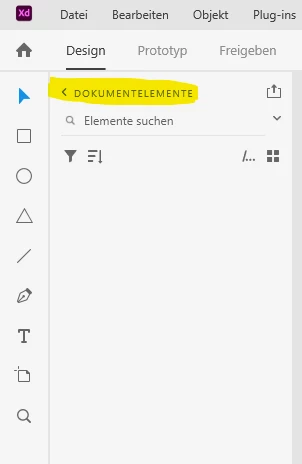
  5. Navigation through the library does not work sometimes. This means I cant switch from the document library to a cc library, for example (see screenshot) and if I click on the Icon to publish as a library XD the new window crashes (XD itself is running but the windows stays in front).
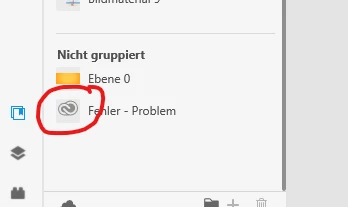
  6. CC preview images stop working for recently changed elements. There no longer are thumnails, instead a Adobe Cloud icon is displayed. 
 

I'm using XD 50.0.12 on Windows 10 (latest drivers installed) und a Surface Book 3.


I deinstalled an reinstalled XD - no effect.

Thank you in advance
Sven


<Title renamed by moderator>

This topic has been closed for replies.
Correct answer HARSHIKA_VERMA

Hi Sven - BDAE,


We are sorry for the trouble. If it's working on another window user then I assume it's something related to the original user account. I would also suggest you please update XD to the latest version (XD 51) and then try again.


Let us know if that helps.


Thanks,

Harshika


2 replies

HARSHIKA_VERMA
Community Manager
HARSHIKA_VERMACommunity ManagerCorrect answer
Community Manager
May 31, 2022

Hi Sven - BDAE,


We are sorry for the trouble. If it's working on another window user then I assume it's something related to the original user account. I would also suggest you please update XD to the latest version (XD 51) and then try again.


Let us know if that helps.


Thanks,

Harshika


Participant
May 16, 2022

UPDATE:
I shared access to the XD document (created with a company account) with my personal Adobe CC account. 
I logged in to another windows user on the same device, there I opened the shared file with my personal Adobe CC account. 
There everyting works as expected including that the preview thumbnail of my CC libraray asset is shown.


It's the same device, same XD version but different windows user and different adobe user.