
Participant
July 21, 2022
Answered

Unable to create a public link from the password link in XD
  • July 21, 2022
  • 2 replies
  • 546 views

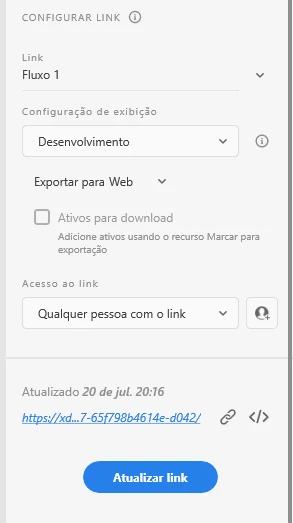
Hi Guys, I'm trying to make a "Public" share but even after it's configured to "give access to anyone who has the link" when accessing the link, the password is asked.

<Title renamed by moderator>

This topic has been closed for replies.
Correct answer Ares Hovhannesyan

Create a public link

Watch this animated illustration to learn how to create a new public link using Design Review preset as an example. 


Create and share a public link using a Design Review preset


  1. Select any one of the presets from View Setting. If you choose Development preset, specify the target platforms, such as iOS, Web, or Android. Need information on other presets? See Work with presets.
  2. Choose Anyone with the link and click Create Link.


Please review Learn how to set access permissions while publishing a shareable design spec and prototype using public, private, and password links in Adobe XD.

2 replies

HARSHIKA_VERMA
Community Manager
Community Manager
July 22, 2022

Hi @Thamirys253371244tbi,


Thank you for reaching out. As our expert, Ares rightly mentioned creating a new link. Once the password links are published, you cannot change the link access setting for them. However, if you want to change the link access settings, then you must create a new link.


Let us know if you need further assistance.


We would be happy to help.


Thanks,

Harshika

Ares Hovhannesyan
Community Expert
Ares HovhannesyanCommunity ExpertCorrect answer
Community Expert
July 21, 2022

Create a public link

Watch this animated illustration to learn how to create a new public link using Design Review preset as an example. 


Create and share a public link using a Design Review preset


  1. Select any one of the presets from View Setting. If you choose Development preset, specify the target platforms, such as iOS, Web, or Android. Need information on other presets? See Work with presets.
  2. Choose Anyone with the link and click Create Link.


Please review Learn how to set access permissions while publishing a shareable design spec and prototype using public, private, and password links in Adobe XD.