

alexanderd94316173
Known Participant
February 19, 2021
Question

Unable to delete linked components

  • February 19, 2021
  • 1 reply
  • 581 views

The sync function of XD seems to be really broken. 
I can't delete a component, nor can I unlink the master document.
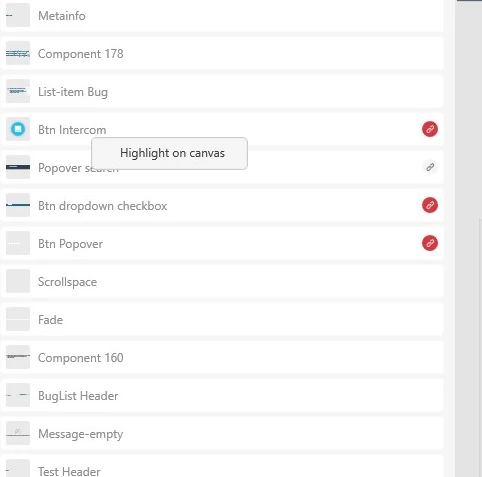
Even though the component in this example has no instance in this document, the only option is to "Highlight on canvas". 


    This topic has been closed for replies.

    1 reply

    monterxz
    Inspiring
    February 20, 2021

    You can not delete a linked component if it's inside another linked component. You have to remove it from the master first.

    Adobe Employee
    February 22, 2021

    Hi alexanderd94316173,
    Thank you for reporting , In addition to Montrexz ans, I would like to add to the above issue, you can unlink the document from the document assets panel, from the filter dropdown, there are two option Filter by Type and Filter by Source, the linked document will be shown under Filter by source there is cross mark at the end of the file name, you can click on the cross, the linked document will be unlinked from the file.

    Hope it helps,

    Regards,
    Ashwini M Hiremath

    alexanderd94316173
    Known Participant
    February 23, 2021

    Sadly the issue is not as simple as this. 
    There is no cross to unlink the document.

    This document state was caused by the following steps: 
    1. Adobe XD was unable to open the cloud document (Design System V1) we are using for our design system. It was endlessly syncing, despite all attempts to fix the problem (unistall, reinstall, reboot, etc). 
    2. I downloaded an offline copy of the cloud document Design System V1, created a new cloud document Design System V2.
    3. I redeleted the original unaccessible cloud document Design System V1.
    4. I linked the new file Design System V2 in the projects where priviously V1 was used. 

    The result: Massive problems, unable to edit and update components, unable to unlink or delete components.