


Participant
October 5, 2018
Answered

Unable to drag and drop images into repeat grid in windows

  • October 5, 2018
  • 3 replies
  • 2690 views

can not drag and drop images from file explorer or browser. (jpgs, svgs, pngs, nothing) into an artboard.

This is a big pain point as I have to set all my images individually and it takes a lot of time I don't have. (Ie. I would like to drag multiple images into a repeat grid and have them populate shapes)

    This topic has been closed for replies.
    Correct answer Randy Edmunds

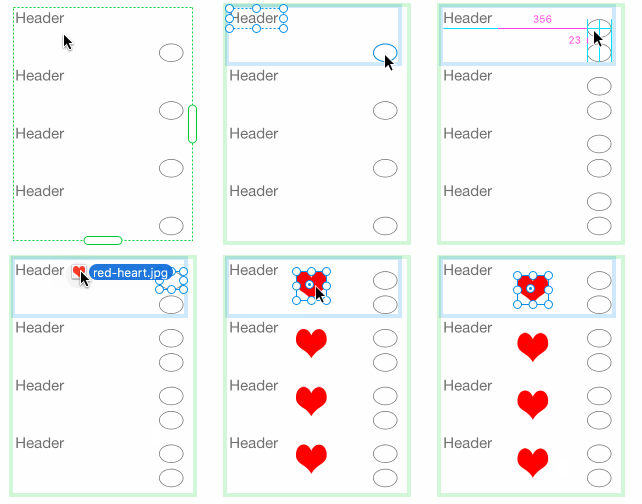
    Adobe XD has what's called an "edit context" that allows you to edit the contents of Groups, including Repeat Grid cells. To enter edit context, double-click on one of the elements. If Group or Repeat Grid is nested inside another Group, you may need to double-click more than once. You can also Cmd-click to select faster.

    In gif below, I change selection, duplicate and move an element, then drop in an image.

    Hope his helps,

    Randy

    3 replies

    Participant
    October 27, 2023

    I haven't used XD for about a year now and now I'm tasked with a site redesign. This, and other automations, are not working for me as well. No news on the Figma front and my company won't approve another subscription. So I'm stuck! I've tried all the 'fixes' posted, but nothing works. Can the team please respond? This is so unacceptable.


    Windows 10 Pro 22h2, XD 57.1.12.2

    Chris W. Griffith
    Community Expert
    Community Expert
    October 27, 2023

    There really isn't a team, so you are sadly on your own. Sorry.

    Participant
    October 5, 2018

    Make sure to select your object(s) first then use the Repeat Grid. Once done, keep your selection and then drag your pictures in it.

    You can't drag a group of pictures in objects that were not duplicated with the Repeat Grid first. For example, you can't just select random objects, activate the Repeat Grid and expect it to know where all of these pictures are supposed to go. I know it's a bummer but that's how I got it sorted out.

    Also your pictures will show in which order you executed the repetition (if you used the Repeat Grid from Top to Bottom, your picture selection will be shown from top to bottom.

    Randy Edmunds
    Adobe Employee
    Randy EdmundsCorrect answer
    Adobe Employee
    October 5, 2018

    Adobe XD has what's called an "edit context" that allows you to edit the contents of Groups, including Repeat Grid cells. To enter edit context, double-click on one of the elements. If Group or Repeat Grid is nested inside another Group, you may need to double-click more than once. You can also Cmd-click to select faster.

    In gif below, I change selection, duplicate and move an element, then drop in an image.

    Hope his helps,

    Randy