


Mexath3
Participant
February 7, 2020
Answered

Unable to enter text in Adobe Xd (bug)

  • February 7, 2020
  • 43 replies
  • 36789 views

Periodicity does not select the text and does not enter it where it is needed, but enters it in a random place, for example, in the "size" field. This bug is the entire existence of the program. I have a midday version. New PC, Last win update 10. I'm so angry that I’m ready to stop using the program. In order for the text to be correctly entered again, you have to restart the program, and this is a long time, and so every couple of minutes - it is impossible to work! Sometimes you can select text in the name of the object and selection in the layout will again become possible, but then this also stops working - the text is not highlighted and not entered. This application is for interface designers, and it does not even allow you to write plain text - horror.
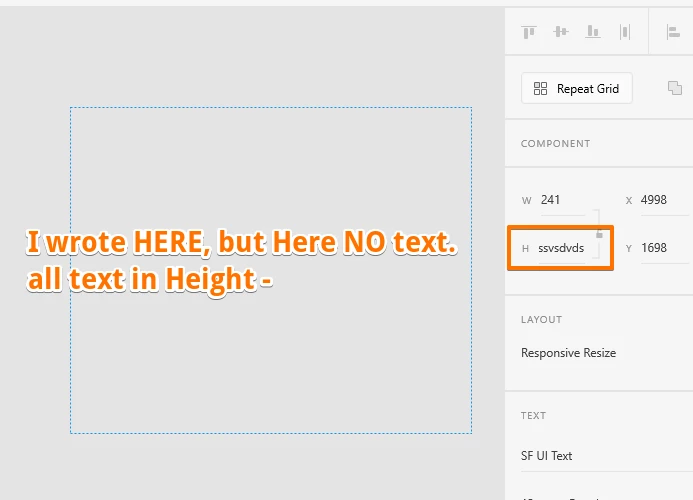
 

{Renamed By MOD}

This topic has been closed for replies.
Correct answer Derya5C29

Hi, here is a solution found on another forum regarding this issue : launch c:\Windows\System32\ctfmon.exe on Run or the explorer or the windows bar. Or you can find this fisher ctfmon.exe et launch it, it will solve the problem. 

This issue is due to severeal language pluged on the computor. Hope it will help

43 replies

Known Participant
November 21, 2021

Unbelivable Adobe its almost 2022! I have still this problem.

Known Participant
November 11, 2021

Adobes answer...."This issue is due to severeal language pluged on the computor. Hope it will help" no its not, its due to buggy software relased by Adobe, youre aware of it as a bug since Sep 2020.... FIX IT ALREADY!!!!!!

Known Participant
November 11, 2021

Similar problem, type tool is just buggy all the time, can Adobe maybe focus on getting the basics right and stop with the releases of stuff like lottie anmimations...unreal that this is still an issue, this is a major problem which is making XD next to useable. @Adobe dont reply this you know its a bug, you know it needs to be fixed, not interested in your canned response, sick of it now.

Participant
September 1, 2021

September 1st, 2021 - I've given up. I'm sick of dealing with this bug day in and day out. My team is finally going to bite the bullet and pay for a service to move our documents from XD to Figma, then shut down our teams Adobe CC subscription. This is obviously either somehow not on Adobes radar, or they simply do not care about getting it fixed from those dealing with the issue day in and day out.


Goodbye, XD. You won't be missed.

Participant
October 8, 2021

Left Adobe CC about a month and a half ago specifically over this bug. Figma has given me absolutely no stress compared to XD in that time.


Never looking back. Good riddance to XD.

Known Participant
August 26, 2021

Another related text bug is in the image attached, whereby text remains highlighted (but non-editable) even when you're doing other stuff. That breaks all other key-commands until you somehow de-select the text, in this case by switching focus and switching back.


Broken text boxes and Adobe XD, name a better combo. Can't wait for the fix, I'm sure it's an annoying bug to solve given it's Windows and all.


Participant
August 18, 2021

Aug. 18th 2021. Still an issue. Hardcore unacceptable. Saying the issue is with Microsoft is also unacceptable. XD is the *only* piece of software I have this issue with. Change how you are doing text input or something. Go check Photoshop way of handling input and use that.


As a software developer myself, I know there may be more to it than just that, but I also know that I'd find it absolutely unacceptable for my software to have to be alt+tabbed out of literally hundreds of times a day in order to get work done.


Adobe made $12b in revenue last year. Fix the software that people are paying money to use and stop making excusing and pointing the finger. No one cares to read why you are passsing the buck. Fix it.

Participating Frequently
March 26, 2022

Amen... and it's still not fixed. I made the switch to Figma. I hope you did too. XD is an absolute flow/productivity killer.


Celestine.Fisser
Inspiring
August 10, 2021

It's August 2021 and I'm dealing with this bug at least 100 times a day. There are still a lot of bugs in XD that annoy me, but this one wins. When will we get an update on this bug?

Participating Frequently
March 26, 2022

Same here. I hope you finally switched to Figma and are working productively again, as I should have years ago.

Participant
July 21, 2021

This bug is still avaiable for Windows' users. It's really annoyng to have to press alt+tab or windows key everytime I want to edit an text. Even in XD UI when I want to change a object's size/position I have to press winkey or alt+tab. 

I already tried to use one language only, I tried the ctfmon.exe sollution and nothing works! 


- XD v41.1.12.9, CC v4.14.0.17

Participant
July 14, 2021

Having the same problem. I tried everything possible. Never expected from Adobe this kind of bug. Its been a year. 

Jesston
Participant
July 13, 2021

Hi,


I'm experiencing the same problems today and it is really slowing my workflow down. I never really noticed this problem on the previous version of XD until I recently updated yesterday: July 12th, 2021.


I've restarted the application just this morning at least 5 times because of this bug. It works great for a little while then just bugs out and when typing the text goes to font name, font weight, or other fields in the text properties panel. It has been extremely frustrating.


Any ideas when a new XD update will be released to fix these text editing / focus problems? I'm trying the solution posted refering to running: c:\Windows\System32\ctfmon.exe to see if this fixes anything.


Thank you,

Jesse