


Mexath3
Participant
February 7, 2020
Answered

Unable to enter text in Adobe Xd (bug)

  • February 7, 2020
  • 43 replies
  • 36894 views

Periodicity does not select the text and does not enter it where it is needed, but enters it in a random place, for example, in the "size" field. This bug is the entire existence of the program. I have a midday version. New PC, Last win update 10. I'm so angry that I’m ready to stop using the program. In order for the text to be correctly entered again, you have to restart the program, and this is a long time, and so every couple of minutes - it is impossible to work! Sometimes you can select text in the name of the object and selection in the layout will again become possible, but then this also stops working - the text is not highlighted and not entered. This application is for interface designers, and it does not even allow you to write plain text - horror.
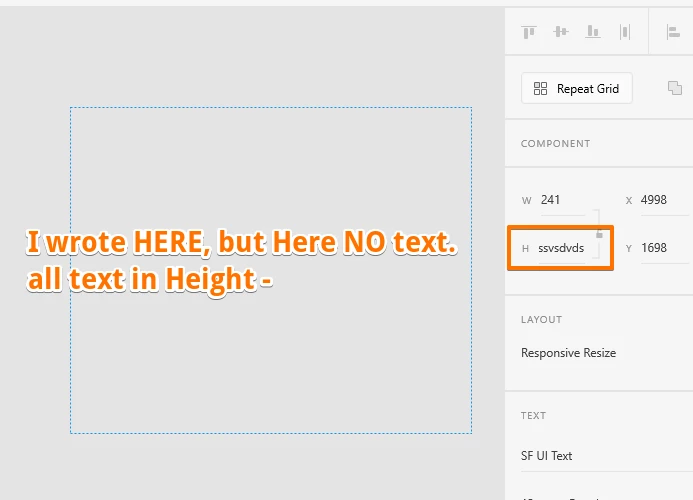
 

{Renamed By MOD}

This topic has been closed for replies.
Correct answer Derya5C29

Hi, here is a solution found on another forum regarding this issue : launch c:\Windows\System32\ctfmon.exe on Run or the explorer or the windows bar. Or you can find this fisher ctfmon.exe et launch it, it will solve the problem. 

This issue is due to severeal language pluged on the computor. Hope it will help

43 replies

Participating Frequently
February 8, 2020

Got the same issue, it gets even worse when the file size gets bigger, restart fixes it for a while... Have this since almost a year, but yeah Adobe probably won't fix it becuase they got their money... On Windows as usual btw

meagant11222393
Participating Frequently
February 7, 2020

I am having a similar problem with text in XD. When I select a textbox to edit the text, the bounding box and the cursor disappear. Half the time I cannot make any edits to the text AND I get stuck inside the textbox (with an invisible cursor). The only thing I can do to get out of the text box is to change the tool I'm using to the shape tool or something else.

Atul_Saini
Legend
February 7, 2020

Hi Mexath3


I can understand your frustration of having one issue after another. However, this looks strange, have you encountered this after the latest release? Is there a specific workflow which triggers this issue(Entering text in height field)? 


Please share the version of XD which you are using at the moment (I have also requested this information in your other post). I would also like to know if this is happening with a specific file or if it is absolutely random. I try my best to help you out here, lets start with this which you have pointed out in the screenshot. 


Thanks,

Atul_Saini