
Dmitri_Albert
Participant
March 18, 2021
Question

Unable to import SVG in XD

  • March 18, 2021
  • 5 replies
  • 9323 views

When I'm trying to import SVGs created with Adobe Illustrator into Adobe XD import fails and XD shows the error of invalid markup.
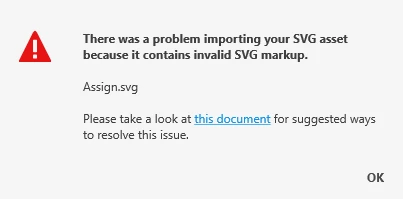
It worked fine before.
When I copy/paste the same graphic from Adobe Illustrator to XD it works fine.
Graphic contains only simple shapes (no special effects, strokes, gradients  etc).

I'm using Windows 10 x64.

This issue occurs within our whole team. Please fix that and let us know how to solve this problem.

 

<Title renamed by moderator>

This topic has been closed for replies.

5 replies

AddOn2U
Participant
December 23, 2021

Same here!
No import of SVGs possible 😒
Windows 10 Enterprise

XD Version 45.1.62.3

Known Participant
October 27, 2021

Same issue, was previously able to import them, now cant. Its just one problem after another with XD

HARSHIKA_VERMA
Community Manager
Community Manager
October 27, 2021

Hi Gavin5E47,


We are sorry for the frustration. We will try our best to investigate the issue. Could you please share the version of XD and the OS you're using.


Are you getting any error message while importing SVG in XD? Is it possible for you to share screenshot or recording of the workflow for better investigation of the issue?


We are here to help.


Thanks,

Harshika

Known Participant
October 28, 2021

Hi Harshika


Its the latest update 45.0.62.17, i have the previous version on another machine and the same vector files can be imported, I can also save those imports in an XD file and open in the latest version.

Thanks
Gavin

Participating Frequently
April 15, 2021

Hey! I'm also having this problem, the exact same error message, and no SVG files work at all (tried 4+++)!! Any tips on how to solve it? 

Community Expert
April 15, 2021

Your image.svg imports just fine. Must be OS related - are you on Windows?

Participating Frequently
April 15, 2021
Yup, Windows 10 (Home version 20H2?)

Mvh,
Emma Shang Hansen
Participant
March 31, 2021

Hi !
I have the same issue when I import svg files, actually it does this since I updated Adobe XD. It has something to do with the last update... I don't know what to do with that but I'd like to know if anyone could give us a solution.

Regards

HARSHIKA_VERMA
Community Manager
Community Manager
April 5, 2021

Hi there,


We are sorry for the trouble. Could you please share the XD file and the SVG file with us so that we can try to investigate the issue? Please share the version of XD and the OS you are using.


Is it happening with every SVG file you import or with the specific file?


We will try our best to help.


Thanks,

Harshika


Rishabh_Tiwari
Community Manager
Community Manager
March 18, 2021

Hi there,


Sorry to hear about the trouble. There are certain un-supported features while importing SVG in Adobe XD as listed here: https://helpx.adobe.com/xd/kb/import-export-issues.html#SVG-files-with-unsupported-properties 


If that's not the case, will it be possible for you to share the SVG with us so that we can test it on our end? You can add the file to shared locations like Google Drive or DropBox and share the link with us through DM. We'll also need the version of XD and OS.


Regards

Rishabh

Dmitri_Albert
Participant
March 19, 2021

Hi.
Here is the example of  SVG (attached). It was created using Adobe Illustrator.

The XD version I'm using is up-to-date:

OS: Windows 10 Pro 64-bit


Community Expert
March 19, 2021

FYI, your SVG file itself is fine and also imports fine to my XD (but on Mac)