
Participant
June 19, 2020
Answered

Unable to open a specific cloud file in XD it keeps syncing.

  • June 19, 2020
  • 1 reply
  • 582 views

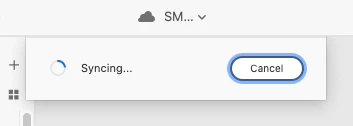
I am working on an XD file with the team. After updating to the latest version of XD, I can't open the file. It keeps showing syncing. I tried to restart my mac and reopen the app, but none of these work.

I can open other XD cloud files. I just have trouble with this one.
 

<The Title was renamed by moderator>

This topic has been closed for replies.
Correct answer Harshika Verma

Hi Bohan,


Sorry for the delay in response. Would you mind trying the steps mentioned in this article: https://helpx.adobe.com/xd/kb/issue-saving-xd-file-creative-cloud.html and see if that helps?


If that doesn't help, please get in touch with our support team using this link: https://helpx.adobe.com/in/contact.html so that you can get the immediate assistance.


Hope it helps.


Thanks,

Harshika

1 reply

Harshika Verma
Community Manager
Community Manager
June 19, 2020

Hi there, 


We are sorry to hear you are having trouble with opening this file. We would request you to please try to open this file from https://assets.adobe.com/cloud-documents and let us know if that helps.


Thanks,

Harshika

Participant
June 19, 2020

Hi Harshika,


Thank you for your reply. I tried to open through cloud documents, but I have the same issues.


Best,


Bohan Chen

Harshika Verma
Community Manager
Harshika VermaCommunity ManagerCorrect answer
Community Manager
June 29, 2020

Hi Bohan,


Sorry for the delay in response. Would you mind trying the steps mentioned in this article: https://helpx.adobe.com/xd/kb/issue-saving-xd-file-creative-cloud.html and see if that helps?


If that doesn't help, please get in touch with our support team using this link: https://helpx.adobe.com/in/contact.html so that you can get the immediate assistance.


Hope it helps.


Thanks,

Harshika