
ahmeds84795542
Participating Frequently
January 4, 2022
Question

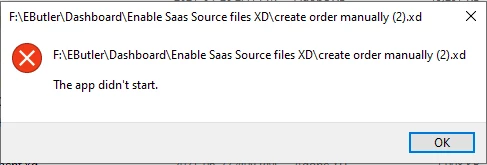
Unable to open adobe Xd on Windows
  • January 4, 2022
  • 2 replies
  • 1222 views

After my windows 10 did some fixs, this message came to me and can not open the XD
I tried to update the same issue, after that I uninstall nad install it again. the same issu
please can any one help my it's urgent


{Renamed By MOD}

This topic has been closed for replies.

2 replies

ahmeds84795542
Participating Frequently
January 4, 2022

Adobe XD v 45.1.62
Window 10 v 21H1

HARSHIKA_VERMA
Community Manager
Community Manager
January 4, 2022

Hi ahmeds84795542,


We are sorry to hear you are having trouble opening XD because of this "Create order manually" XD file. Could you please go to this error message location and see if the file exists there?


Please ensure to save the file locally to keep the backup.


We'll try our best to help.


Thanks,

Harshika

ahmeds84795542
Participating Frequently
January 4, 2022

the file is there in the same location, the adobe XD don't open from any where ( the creative cloude / the desk top ) it's open and close. open and close

HARSHIKA_VERMA
Community Manager
Community Manager
January 4, 2022

Thanks for checking. Could you please move the file to a different location and also create a copy of the file as a back up and see if that helps?


Please also check if you are able to open the files from here: https://assets.adobe.com/cloud-documents


We'll try our best to help.


Thanks,

Harshika