



Serhii Hubernachuk
Inspiring
Nov 13, 2020 9:30 AM UTC
Answered

Unable to open the cloud document "Error: Something went wrong – 2163"

After the latest update, I have issues with several of my documents (I see I'm not alone here at the forum with this). How to fix this?


Foreseeing the same questions from support:
1. I have the latest XD, auto-update is turned on (34.4.12.3)
2. Two of these errors are with cloud documents.
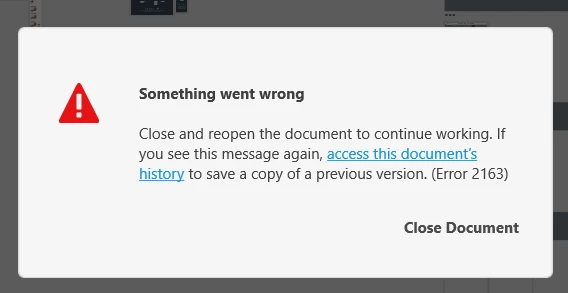
 

 <The Title was renamed by moderator>

This topic is closed to new replies. Start a new post to keep the conversation going.
Participant
Jan 28, 2021 10:24 PM UTC

Hi there,


Sorry to hear you are having trouble with XD. Would you mind trying the steps mentioned in this article: https://helpx.adobe.com/pl/xd/user-guide.html/pl/xd/kb/fix-issues-with-xd-cloud-documents.ug.html?


Let us know if that helps.


Thanks,

Harshika


Quitting the CC process and restarting CC and opening the cloud document in XD solved the problem.
Thanks Harshika!

7 replies

Participant
Jan 28, 2021 8:45 PM UTC

As others have pointed out, Co-editing XD files is an infuriating process. Even working on different screens in the same XD file causes conflicts. I just got this error 2163 on the latest XD release on an apple M1. Issue is, it was the document with shared components that other XD files were using. So if I restore the file and rename it to a new document, I lose the links from documents with components to the original file. 

Translate
Participant
Jan 28, 2021 9:11 PM UTC

Come to find out, I think the v 36.2.32 release that auto installed this morning is probably what caused my document error 2163...please Adobe help fix my document or linked components!

Translate
Harshika Verma
Community Manager
Community Manager
Jan 28, 2021 10:13 PM UTC

Hi there,


Sorry to hear you are having trouble with XD. Would you mind trying the steps mentioned in this article: https://helpx.adobe.com/pl/xd/user-guide.html/pl/xd/kb/fix-issues-with-xd-cloud-documents.ug.html?


Let us know if that helps.


Thanks,

Harshika

Translate
RaikenUX
Participating Frequently
Jan 4, 2021 4:09 PM UTC

The Problem still exists and is more than annoying. Hope the next bigger update will fix it 😕😕

Translate
Participant
Nov 19, 2020 6:24 PM UTC

Hi, Serhii – In the past week or so my team and I have begun seeing this error upon opening design files. We have tried the troubleshooting steps suggested on the linked page below with no success, but discovered today that any file with Coediting turned on creates this problem. If you turn that feature off, perhaps you will not see the error. Our steps:

  • Access the document's version history through the hyperlink in that error message
  • Open a recent version
  • "Save As" a new file name
  • Share with someone on your team (co-editing should be off by default)


You will have to re-establish any share URLs using the new file and of course lose any work captured in the most recent version, but hopefully you'll be able to access the document.


Coediting will be a beautiful feature when it works properly, we've used it enough to love the potential, but right now it's just causing crashes in complex work files.

Translate
Harshika Verma
Community Manager
Community Manager
Nov 17, 2020 1:06 PM UTC

Hi there,


Sorry for the delay in response. Would you mind trying the steps suggested in this article: https://helpx.adobe.com/xd/user-guide.html/xd/kb/fix-issues-with-xd-cloud-documents.ug.html?


Let us know if that helps.


Thanks,

Harshika 

Translate