
Participant
October 22, 2020
Answered

Unable to rename the assets in the asset panel in XD.

  • October 22, 2020
  • 1 reply
  • 1177 views

Hi,

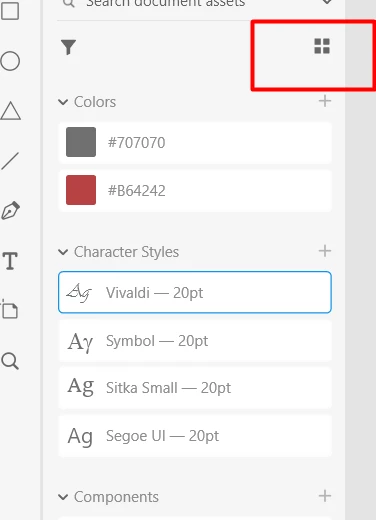
I've been trying to learn XD, so I'm new in this. Haven't been able to find a related topics. I had some font styles that I'd like to add to the assets, but for some reason I am unable to change asset names in the asset library. Double-clicking doesn't trigger any action on the program side. Any ideas as to why this is happening? I've attached a snip from the asset library, it even looks different than what I've seen on the internet.

Yup, the program's up to date.


Thanks and have a great evening/afternoon/morning, wherever you are 🙂


<The Title was renamed by moderator>
This topic has been closed for replies.
Correct answer Harshika Verma

Hi Stanis,


Welcome to the Adobe XD Community. Hope you're doing great. 


We are sorry to hear you are unable to rename the assets in the asset panel. Could you please check if you are under gird view and then try to rename the assets? From the screenshot it looks like you are in list view. 


Please see the attached image below-


Hope it helps.


Thanks,

Harshika

1 reply

Harshika Verma
Community Manager
Harshika VermaCommunity ManagerCorrect answer
Community Manager
October 22, 2020

Hi Stanis,


Welcome to the Adobe XD Community. Hope you're doing great. 


We are sorry to hear you are unable to rename the assets in the asset panel. Could you please check if you are under gird view and then try to rename the assets? From the screenshot it looks like you are in list view. 


Please see the attached image below-


Hope it helps.


Thanks,

Harshika

Participant
October 22, 2020

Oh my God. I am soooooo stupid 😄 Thanks a lot, that indeed solved the issue. Oh well, learning every day 🙂