Inspiring
October 28, 2019
Question

Unable to rename the layer with double click in Adobe XD.

  • October 28, 2019
  • 2 replies
  • 2767 views

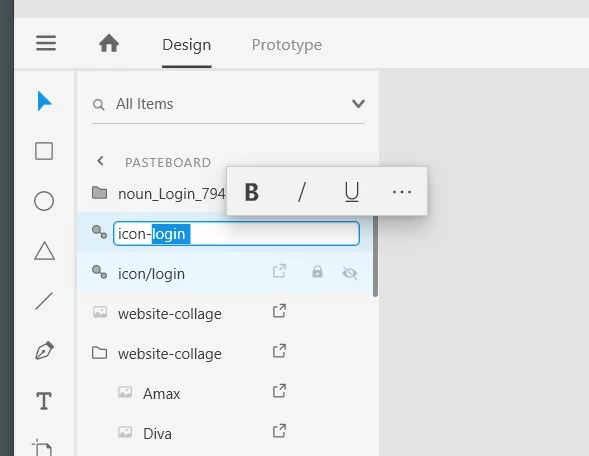
When creating a new component, I want to rename it then I go to components view and double-click to rename.

Then it flashes and prevents me to rename it. The only solution is to go right-click and rename. Also, a toolbar starts appearing in the rename area? But this isn't a rich-text area, it's simply a text field. So this is bug.


Here is a video:

Rename double-click bug Video 


Rich Text Toolbar bug on rename?


<The Title was renamed by moderator>

This topic has been closed for replies.

2 replies

Harshika Verma
Community Manager
Community Manager
October 30, 2019

Hi there,


We are sorry to hear you are facing trouble renaming the components by double clicking a layer in Adobe XD. I am unable to reproduce the same at my end on my windowds machine. We would like to know a few more details to investigate about the issue-


  • What is the OS & XD version of your machine?
  • Is it happening only with linked components or with all the components that you create?
  • Is it happening with a specific file or with all the file?


We would request you to please try creatung a new component in a new file and let us know if you are able to rename the component.


Thanks,

Harshika

Known Participant
October 30, 2019

What is the OS & XD version of your machine?

my OS is WIN10 ,  XD is 23.1.32.2.

Is it happening only with linked components or with all the components that you create?

Yes, both will happen

Is it happening with a specific file or with all the file?

it happening with a specific file , All files created before the update are not available.

Preran
Legend
October 28, 2019

That isn't the expected behavior to be sure. This looks like an issue with the graphic driver to me. Can you try updating the graphic driver of your computer by visiting the manufacturer's site? 

Known Participant
October 30, 2019

I also have the same bug.