

myuniquescreenname4
Participating Frequently
November 14, 2019
Answered

Unable to see option for "Share for development" in Adobe XD.

  • November 14, 2019
  • 2 replies
  • 1378 views

there were two menu when I share a file with others. ( To sare for reviewing and to share with develpers. )

after updating XD, the menu 'share with develpers' disappeared. how can i share the detail information with develpers then? like, size info, color info and etc.


<The Title was renamed by moderator>
This topic has been closed for replies.
Correct answer elainecc

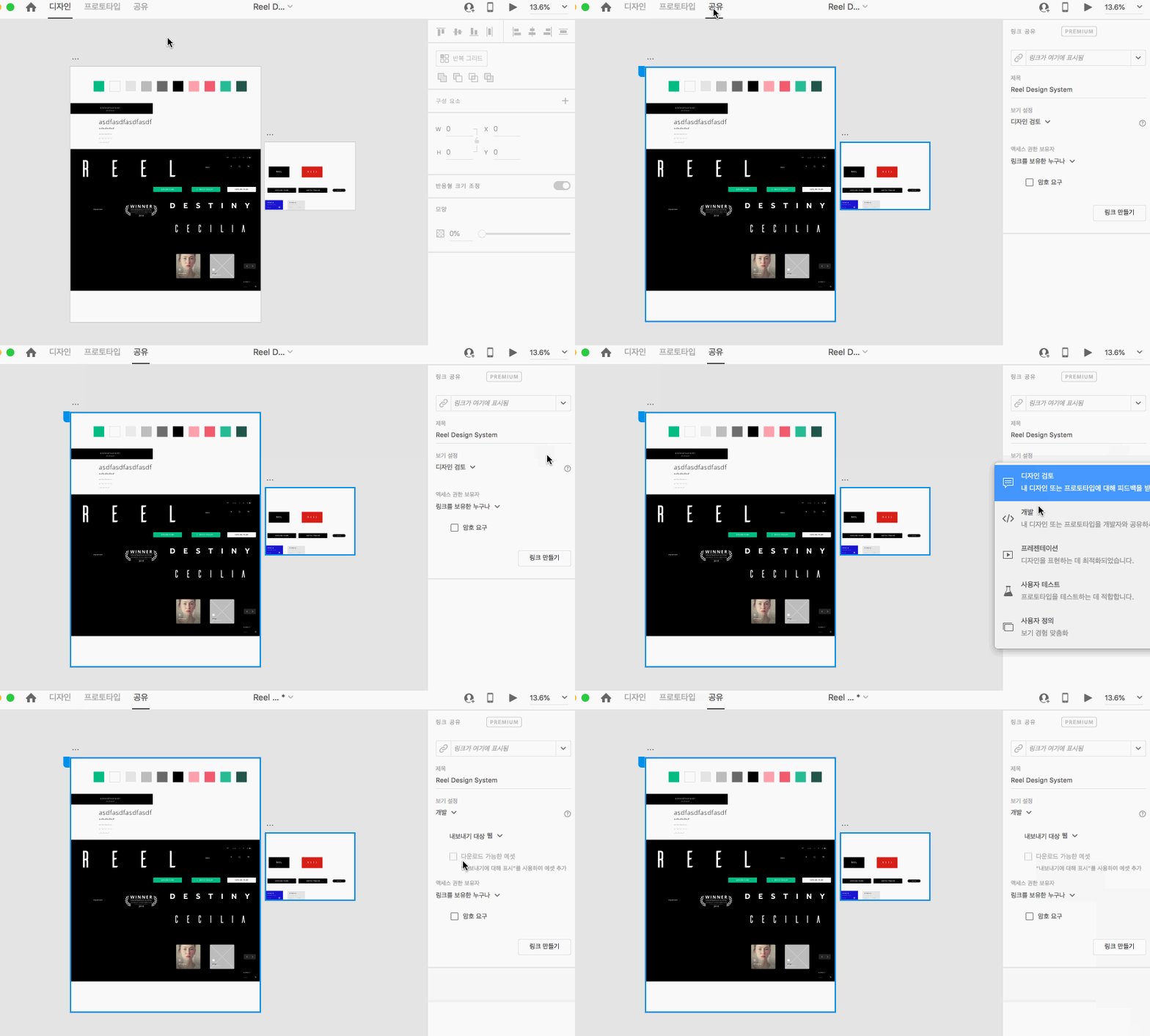
We moved it from the Share button (upper right hand corner) to a new mode called "Share Mode." Here's an animated GIF of what it looks like in Korean:


2 replies

Ares Hovhannesyan
Community Expert
Community Expert
November 14, 2019

Please review https://theblog.adobe.com/xd-november-2019-update-coediting-more

The power of collaboration in XD

Design is an inherently collaborative process. It involves deeply understanding problems and crafting solutions based on data, empathy, research, and a constant dialogue with users, teammates, and stakeholders. In the MAX 2019 release of XD, we’re taking a massive step forward in enabling collaboration with XD.


Coediting (Beta)

Coediting, available today in beta, lets you and other designers work together in XD in real time. Coediting operates seamlessly in the background of XD, allowing multiple designers to design and iterate in the same cloud document at the same time, while benefiting from the performance and quality of our native application. With Coediting, you and your teammates can design together in a centralized source of truth without worrying about duplicating work or maintaining redundant documents. Coediting removes unnecessary friction so you and your team can do you best work.


myuniquescreenname4
Participating Frequently
November 17, 2019

thanks for the reply. but the problem that i'm facing at the moment is.. this.

there was a function that gives develpers about detail information of desgin work. like each assets size, color and etc. but it all diaapeard after the new update. i'd like to know how i can give develpers about those info now?

please see the attached image file above. the menus that im seeing on my xd here is different from the youtube video you sent me 

elainecc
elaineccCorrect answer
Participating Frequently
November 19, 2019

We moved it from the Share button (upper right hand corner) to a new mode called "Share Mode." Here's an animated GIF of what it looks like in Korean:


Harshika Verma
Community Manager
Community Manager
November 14, 2019

Hi there,


We are sorry to hear you are facing trouble sharing the design in Adobe XD. We would like to know a few more details like-


  • What is the OS version of your machine along with the screenshot of the About XD info?
  • Could you please share the screenhsot of the option that you're getting while sharing the design in XD?


We will try our best to help.


Thanks,

Harshika


myuniquescreenname4
Participating Frequently
November 15, 2019

hi. here are the images.