

bradgl
Participant
October 27, 2021
Answered

Unable to see the large imported illustrator artboard into XD correctly

  • October 27, 2021
  • 1 reply
  • 1811 views

Hi everyone,
I have a website design I've created in Illustrator with 27 artboards. To present the initial 4-5 page concept design to the client I previously imported the AI into XD without any issues. Now when I open the 27 page AI, it brings the site in at 10% of the actual pixel size. For example, the homepage artboard is 1440px w X 3454 px H but imports in at 144px w 345px h. Please help as you cannot zoom more than 200% when sharing the XD link. Anyone had this issue or tips to rectify?


<Title renamed by moderator>
This topic has been closed for replies.
Correct answer Spas K.

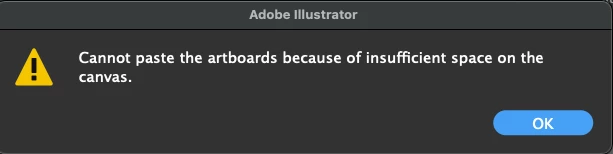
If I send you the full file would you be able to correct it for me, it doesn't seem to be working for me and I get this error. No worries if you can't.


You might have to copy them one at a time, and move them around so they will fit inside the new smaller canvas. If they can't fit, split them into multiple files.

1 reply

Spas K.
Community Expert
Community Expert
October 27, 2021

Hi Brad, would you be able to share the .ai file with just one artboard, so we can check it out and try to replicate the issue?

In case it's confidential, you can send it via PM. You might not be able to attach it, so uploading to some cloud service and sharing the link is fine as well.


You can also send screenshots from Xd with the imported file on the design tab with one of the artboards selected, and the layers panel visible.

bradgl
bradglAuthor
Participant
October 27, 2021

Thanks @Spas K. 

I'm new to XD so hopefully this can be worked out - appreicate your help.

Working files of 1 artboard here:
https://www.dropbox.com/sh/0z81wbp1mi4j2pn/AAB5cyjbkLjgIoIgbS7ypR1Xa?dl=0

Spas K.
Community Expert
Community Expert
October 27, 2021

Hey, found your issue 🙂


So, in Illustrator, you're using a "large-sized canvas", which I believe was introduced in illustrator v24 (might be wrong though). This allows your drawing area in illustrator to become a lot bigger. The previous limitation was 227 inches, and it can now get to 2270 inches (i.e. 10 times larger). However, if you try to import a file with that bigger canvas into an older version of illustrator, your whole document and all artboards (regardless of whether they are bigger than the old "limited" canvas), will get reduced 10 times, so they fit into the older limitation.


You can read all about that here.


Xd seems to import .ai based on that older limitation, so because you are using the bigger canvas, it resizes everything down 10 fold. Problem is you cannot change this in an existing .ai file. This option is only available when you are making a new one. It's not really obvious, as the only indication you get is a little warning sign next to the Create button:


To fix your issue, create a new .ai file, and set the initial dimensions to something less than 16000px. This will make a document with the older 227" sized canvas. If you then paste all your artboards into that file, and import into .xd, they should import fine.