


claras875940
Participant
July 22, 2020
Answered

Unable to update the added screens to existing link

  • July 22, 2020
  • 3 replies
  • 516 views

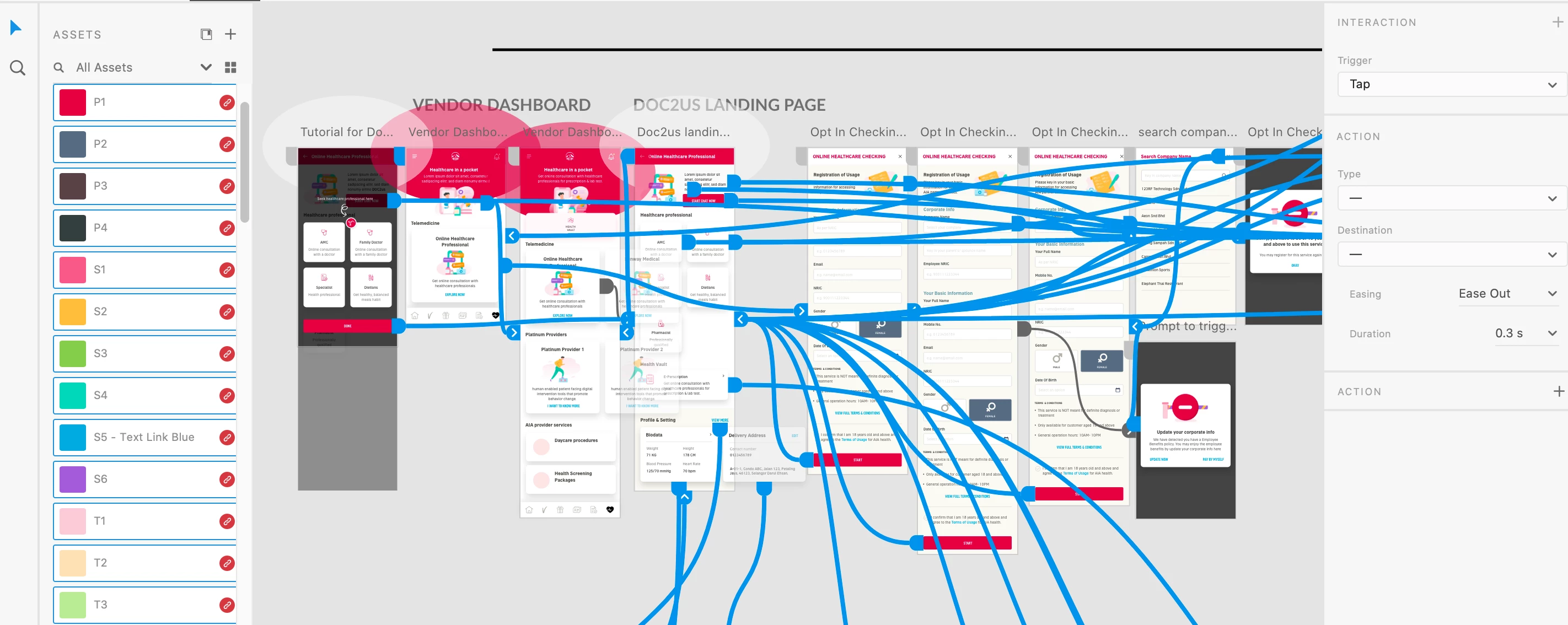
I can't updated the latest screen to my existing link. Even I have linked all my visuals @ prototype tab, but the newly added screen still greyed-out. Anyone facing the same problem?  


(Images Deleted by Moderator at OPs request)

This topic has been closed for replies.
Correct answer Harshika Verma

Hey Clara,


We would like to follow up on your issue here. Would you mind confirming if the issue has been resolved? Please let us know if you need further assistance.


We are here to help.


Thanks,

Harshika

3 replies

Rishabh_Tiwari
Legend
July 22, 2020

Hi Clara,


Thanks for reaching out. In addition to what Vertika suggested, you can also try unsettling the home artboard and then try publishing and let us know if this helps or if you need any further assistance.


Regards

Rishabh

Harshika Verma
Community Manager
Harshika VermaCommunity ManagerCorrect answer
Community Manager
August 4, 2020

Hey Clara,


We would like to follow up on your issue here. Would you mind confirming if the issue has been resolved? Please let us know if you need further assistance.


We are here to help.


Thanks,

Harshika

Community Manager
July 22, 2020

Hi Clara, 

I can see from screenshot your first artboard is not home artboard and second artboard is home artboard that is completely fine but all the wire all going from artboard 1 to other artboards, so if you update a link also there is no way u can enter in that artboard. So please either make that artboard as home artboard or please change the flow so from homeartboard flow you are entering into artboard 1.

Hope you are able to work now.

Please write to us for any further query.


Thanks, 

Vertika Gupta

Adobe XD