


Inspiring
September 24, 2024
Answered

Update XD (presentation) link doesn't work (anymore)

  • September 24, 2024
  • 1 reply
  • 785 views

I can no longer update the (presentation) link of my layout in XD. This has been going on for a few days now.
I have reset my computer several times.
I have logged out (and logged back in) in Adobe Cloud.
I have also copied the entire layout to a new file, makes no difference.
Could the file be too large, 245MB?
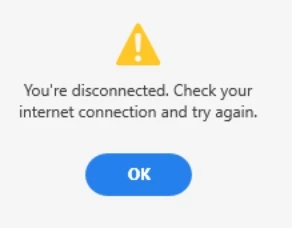
XD itself indicates that I am disconnected, but what does that mean...? (it's not that I don't have an internet connection)
Help is needed 🙂
This topic has been closed for replies.
Correct answer gerthaw35480458

I think the problem is in the photos being too big. I didn't have them before. Until my web builder said leave the photos big, they will be automatically reduced. But the strange thing is, I sent him the design and he could easily make an active link out of it.


I just put in new pages 1 by 1 (not the first 4) and it also stops at page 4. It's driving me crazy. I think I'll have someone else make the link for this assignment every time, I can't see any other solution right now.


Thanks for your tips, I learned something again 🙂

The last attempt was made. I uninstalled XD from my computer and reinstalled it and now everything is working again. The link refreshes very quickly. Thanks for walking me through this.

1 reply

Spas K.
Community Expert
Community Expert
September 26, 2024

So you cannot create or update links with any file, even a new and empty one? Or is it just with the contents of this file?

Inspiring
September 26, 2024

Thanks for your response. It's only with this file. With other files it's no problem at all. I sent it to a colleague and he was able to make a link of it. So it's apparently my computer. The problem remains.

Spas K.
Community Expert
Community Expert
September 26, 2024

Have you tried reinstalling Xd?

So, if you make a new empty file, you can make a link, but if you copy the contents from this file into the new file, you can no logner update the link or make a new one?


You can try to copy the content in small increments, and identify which component or element is causing the issue.