

Use inner shadow to create a calendar widget with XD 41!
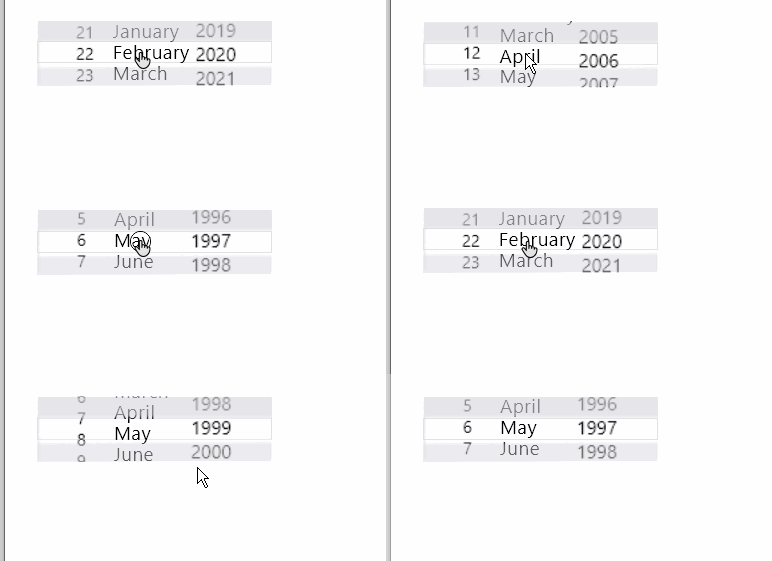
Here are 5 easy steps to create a calendar widget using inner shadow
=========================================================
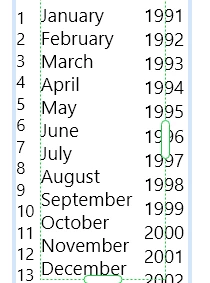
Step 1: Arrange 3 repeat grids with
dates, months, and years

Step 2: Mask the repeat grids with a rectangle
Step 3: Create two rectangles, apply inner shadow settings as {X=0, Y=20, B=3} for one, and {X=0, Y=-20, B=3} for another. Place both the rectangles over 3 rows of repeat grids

Step 4: Duplicate the artboard and change the date range by simply arranging repeat grids
Step 5: Use Tap" trigger and "Auto-animate" action to wire the 2 artboards.
=============================================================
Here is another application of inner shadow which you can try <Preran's post>. We'd love to see what you can create using this feature. For more information on inner shadows, see this link: https://adobe.ly/3v3MSfC.
Please post your creations and let us know how this helped your productivity.
Post away!
Atul_Saini


 AdChoices