Participant
Dec 24, 2019 8:17 AM UTC
Answered

Using Component states with hover and tap transitioning to another artboard

Hi,


I have created a simple text component and given a hover state and a tap state.

On hover, a tooltip shows up.

When I tap on the component, transitioning to another artboard is the function.

Only one works at a time.


Please advise.

Diya

This topic is closed to new replies. Start a new post to keep the conversation going.
Ares Hovhannesyan
Ares HovhannesyanCorrect answer
Community Expert
Dec 24, 2019 1:39 PM UTC

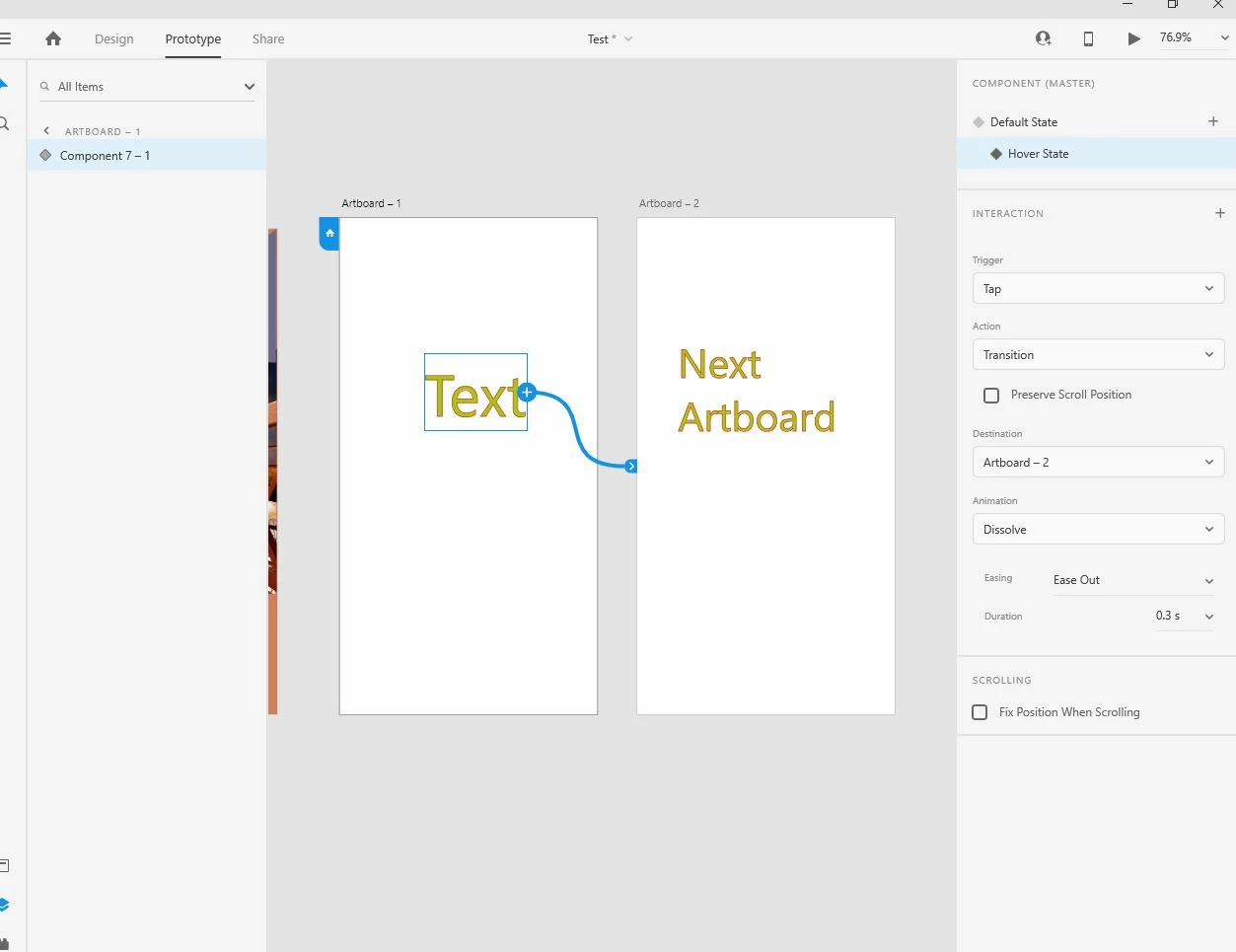
You need to use multiple interaction for assigning different iteraction for the same object. Assign tap interaction to component when it is in hover sate: see capture. 


Please also review https://helpx.adobe.com/xd/help/whats-new/2020.html#multiple-interactions


Also I have attach my youtube video (but in my native languge) about multiple interaction. https://youtu.be/Hs8TZEOKIRI Hope this will help

5 replies

Participant
Dec 1, 2020 6:02 PM UTC

I understand I can make two actions if I have two artboards connected. But what about if I want to make it on same artboard?


I am making website design and I would like to have a left and right button with hover and click action. When I click right it slides from slide 1 to 2. Each slide (5 of them) has photo and text. 

About scrolling to infinity I made it easy actually. 😉 Click on right button on fifth slide (5/5) puts you back to slide 1. 

Thank you,

Denis

Translate
Ares Hovhannesyan
Community Expert
Community Expert
Dec 24, 2019 12:37 PM UTC

Do I undestand right? When you tapping component it shows target artboard. 


1. Tap component

2. Targeted artboard show up

3. tap the same component on the targeted artboard

4. Nothing change


Translate
Participant
Dec 24, 2019 12:46 PM UTC

Thankyou for a quick response. Let me explain my situation in detail:


1. Created a component which includes only text in default state

2. Added a hover state, that would display the tooltip when cursor is on top of the text.

3. Added a tap state, in which, user would be directed to another another on click of the component. (same text component).


Problem facing:

On prototype mode - both functions are not working together. Either the hover (tool tip) works or tap (transition) works.


Desired Solution:

When user hovers on the component, the tool tip would display and on clicking of the same component, the user is redirected to another screen.


Thankyou again.

Diya

Translate
Ares Hovhannesyan
Community Expert
Ares HovhannesyanCommunity ExpertCorrect answer
Community Expert
Dec 24, 2019 1:39 PM UTC

You need to use multiple interaction for assigning different iteraction for the same object. Assign tap interaction to component when it is in hover sate: see capture. 


Please also review https://helpx.adobe.com/xd/help/whats-new/2020.html#multiple-interactions


Also I have attach my youtube video (but in my native languge) about multiple interaction. https://youtu.be/Hs8TZEOKIRI Hope this will help

Translate