


Participant
October 13, 2019
Answered

Washed out colors after export in XD
  • October 13, 2019
  • 14 replies
  • 27595 views

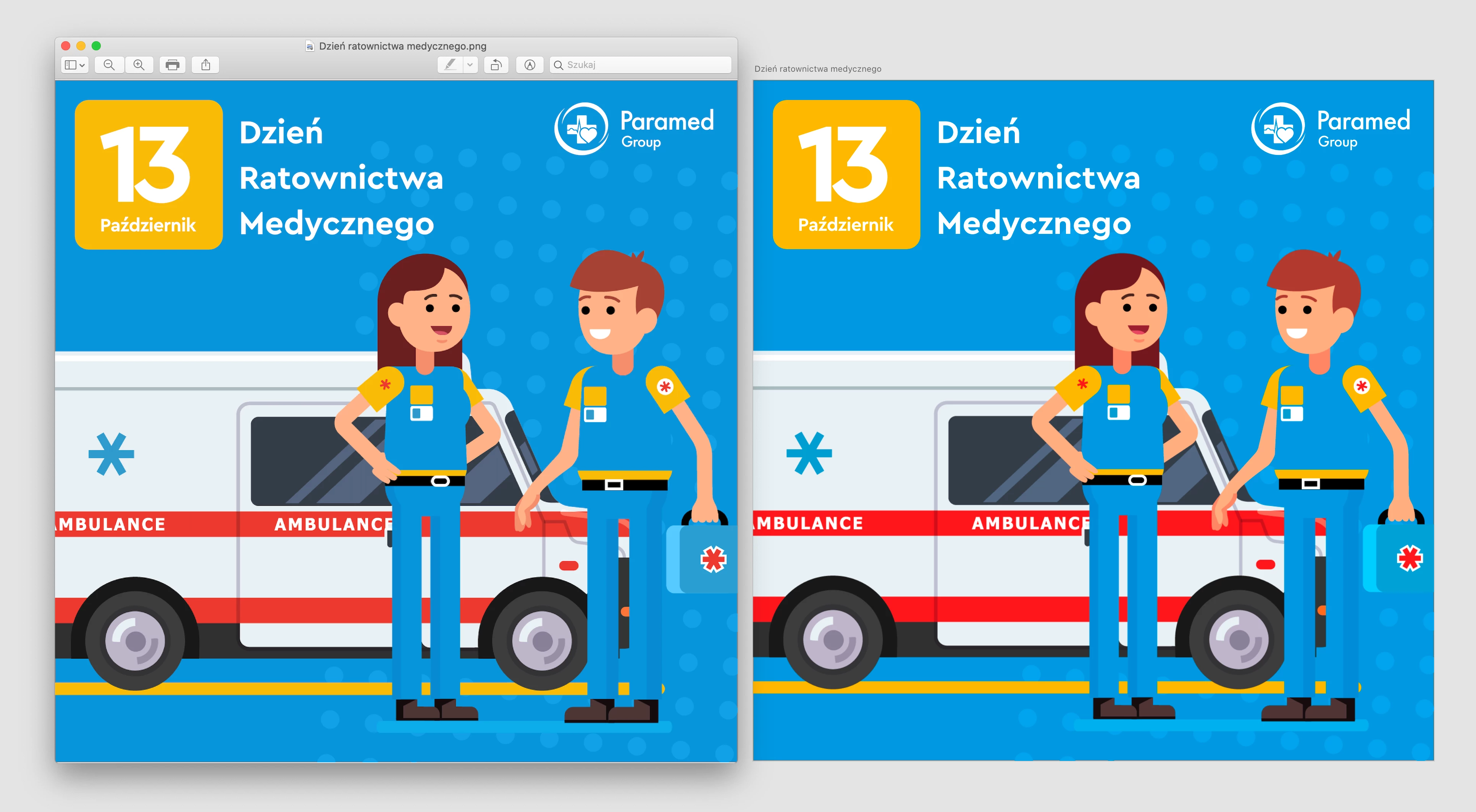
Hey, im trying to design something in XD and always after exporting to for example .png, colors are washed out.

I attached screenshot where you can see exported png (at left) and XD preview (at right).

As you see colors after export are less saturated and washed out than during designing in XD.

    This topic has been closed for replies.
    Correct answer Kenneth Kawamoto

    XD is now default to sRGB: https://helpx.adobe.com/xd/help/color-management.html

    14 replies

    Participant
    June 4, 2024

    To solve this problem, firstly I save the images for the web in Photoshop (Shift + Option + Command + S) and then replace them in the XD file. These should now export with original colours.

    Kenneth KawamotoCommunity ExpertCorrect answer
    Community Expert
    July 13, 2023
    dianat19225747
    Known Participant
    July 13, 2023

    Thank you for sharing! I hadn't noticed this update. Our whole creative and production department are jumping for joy after years of disappointing clients, lol.

    Participant
    September 20, 2023

    Am I the only one who's suddenly experiencing the opposite: Lighter colours look washed out in XD compared to exports, prototype mode etc. E.g., a light green looks plain grey. For making it look right while working in XD, the only solution I've found was to TURN OFF the sRGB-profile!?? (using latest PC version 57.1.12.2)

    Participant
    April 19, 2023

    Finally, the export colors are not washed out - they represent the color values of the colors.
    However, the colors in the XD itself are over-saturated, so we have to constantly export images to get idea what color we've choosen.
    I'm on a 16" Mac M1, MacOS Ventura 12.2, latest XD with no plugins.


    Participant
    April 1, 2023

    I got the same problem, and i agree with all the comment saying that Adobe team is disrespectfull towards its users. 

    YOU are supposed to be the leader and YOU do beginners mistakes. 
    So please invest in making your customers HAPPY. 
    BEFORE i was advising XD, NOW i'm like "it's a fine product not a perfect one" 
    SO MOVE YOU FXXING DEV TEAM ! 


    Rishabh_Tiwari
    Community Manager
    Community Manager
    April 7, 2023

    Hi @Lavish_dynamism0D45 ,


    We're so sorry about that. I understand how frustrating it can be when the tool you're using doesn't have the needed feature so let me assure you I'll share your feedback with the team. 


    Thanks

    Rishabh

    Participant
    April 13, 2023


    Hi, 
    This is what's happening.
    Basically, the only way to get use XD is through Screenshots, which you may guess is completely unacceptable.
    Fixing color in Browser (????....) as mentioned over and over earlier in this discussion is just a ridiculous suggestion...
    Come on guys, fix this... We really can't work like that! It's a TOP priority issue!
    Greetings

    dianat19225747
    Known Participant
    December 30, 2022

    This is getting ridiculous since its not just exports that have different colors. The HEX colors appear different, too. It's impossible to choose colors in XD. Designers have to first use Illustrator or some other tool to select colors since XD will not accurately display them. It's a terrible workflow and I wish, years later, this would be fixed.

    dedreand48379802
    Participant
    July 7, 2022

    I am experiencing this issue now and never have before in the past and have worked on many XD projects. I even went to a web-safe colors website to verify the color I was trying to use is websafe and find the closest color and it displays perfectly fine on that website... Yet in the XD link and exported files the color looks dull and flat and totally kills my design. This is pretty unacceptable especially if it's something that's been happening for years. And Adobe reps giving the same canned answers. PLEASE fix this!

    VADIM.US
    Participant
    June 1, 2022

    https://gregbenzphotography.com/photography-tips/how-to-setup-proper-color-management-in-a-web-browser

    Solved. 🙂

    Works 100%

    The problem is in proper setup color management in your web browser

    This guide will explain you how to do it. I've changed my Chrome browser color to HDR10 and it worked perfectly. 

    Here is a link to Chrome color management chrome://flags/#force-color-profile

    Have a great day 🙂

    Known Participant
    June 1, 2022

    Hey, Vadim

    Thanks for the input.
    Chrome does have limited color management, though other browsers approach it differently.
    But that's an end-user action.
    The problem people have here is that XD itself is not color managed, so it doesn't send out a file to other apps (not just browsers) that has the necessary information to translate color in a device/app independent way.

    Cheers

    Tom

    Participant
    May 5, 2022

    Please fix this. I love adobe XD and it is so frustrating that I can't use my assets after designing them. I believe people would be ready to pay a bit extra per month if this issue got fixed.

    It has been too much time. If you do not intend to fix it, at least tell us so that we can look for other alternatives because this isn't sustainable anymore.

    JUST FIX IT.


    Participant
    May 22, 2022

    It's really unacceptable that such a basic isssue gets simply ignored by Adobe for so long. Stop all minor, tiny update efforts AND GO FIX THIS once and for all. It seems you priorities are a little messed up.

    Participant
    February 10, 2022

    I've been searching for an answer to this issue all day and finally figured it out. I think. 

    Because XD doesn't have color modes I found that within XD, it displays colors to be more saturated than they actually are. 

    I had a specific HEX color code from an online document and was copy/pasting the fill color into elements in XD and also in Illustrator. XD displayed the color much more saturated and I couldn't figure out why. I was thinking this was an issue with XD and distorting the colors through the export process, but actually the color was correct based on the HEX code and it was just displaying much more saturated in XD. 

    I exported the asset from XD and compared the color side by side with the online document and found that they were exactly the same color, even though XD displayed the color as much more saturated in my working file. 

    Definitely need this fixed within XD, but in the meantime I've been picking colors and pulling color codes in Illustrato, and copy/pasting the color code into XD. Not ideal considering you can't see the actual color but for export purposes it works just fine. 

    Participating Frequently
    February 12, 2022

    The issue is more complex than that. 


    It appears XD does not even export colors consistently between jpg and png.


    Check out these two exported images below, and how the orange color appears darker in multiple places versus the png. Both exported from XD.

    Participating Frequently
    February 14, 2022

    All said and done it's an issue that needs fixing ASAP. I haven't got time to mess about firing up Illustrator and using color codes from other apps. The fact is the colour problems upon export are a disgrace and should not be happening.

    Participating Frequently
    February 7, 2022

    It's just another massive issue that Adobe cannot be bothered to fix. I have just experienced the same problem. High end UI design exported to J-Peg colours are washed out, it's appalling and changing your monitor settings will not make a blind bit of difference. I'm glad I cancelled my subscription. It is appalling and not the only issue with their bloated memory hogging software.