Preran
Legend
April 29, 2019
Question

Weekly Challenge - Create Scrollable Artboards

  • April 29, 2019
  • 1 reply
  • 10722 views

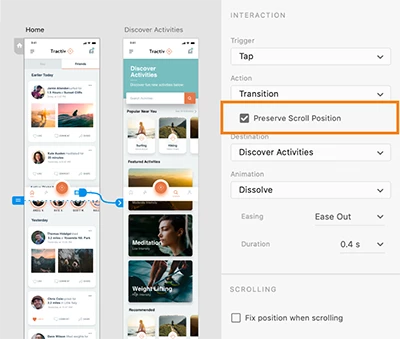
Resize artboards to make vertically scrollable content. Learn how to preserve scroll position and fix position when scrolling.
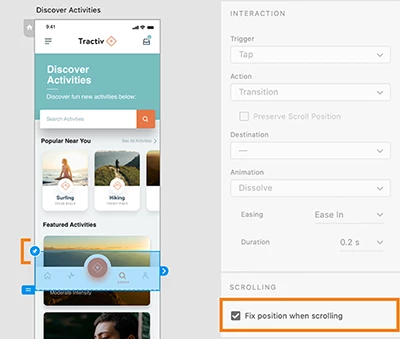
The challenge

  1. Create a scrollable artboard in Adobe XD
  2. Share your published project by replying to this post. (Psst...if you share it privately, we will not be able to view it.)
  3. Describe your experience with using this feature, and provide suggestions around improving it. We will feature the best shares on our social media properties, with the required citations.
  4. For Horizontal Scrolling in Adobe XD, see Weekly Challenge : Horizontal Scrolling in Adobe XD

Trigger animations on scroll (Workaround Solution) - Video Tutorial by Punit Chawla (6 min)

This topic has been closed for replies.

1 reply

punitc14433720
Participant
May 15, 2019

I've always found scroll works best if there is an action happening on scroll. It makes the whole experience a little more 'immersive' so as to say. It also works well with fixed headers or actions which need attention from the user.  Adobe Xd doesn't have a scroll trigger yet, however, I've tried a workaround which is pretty effective and gives a similar experience to a scroll trigger.

Here's the scroll trigger video tutorial : Scrolling Actions in Adobe XD - Animate on Scroll - Design Weekly - YouTube

Preran
PreranAuthor
Legend
May 15, 2019

This is great info, Punit. Thank you for sharing!

punitc14433720
Participant
May 15, 2019

Just trying to help the community out!