
Inspiring
August 15, 2021
Question

When enabling Stacking in a group some items are grouped together how to prevent?

  • August 15, 2021
  • 2 replies
  • 2033 views

Sometimes when I enable Stack feature on a group of items, some of the items are put into a new group.
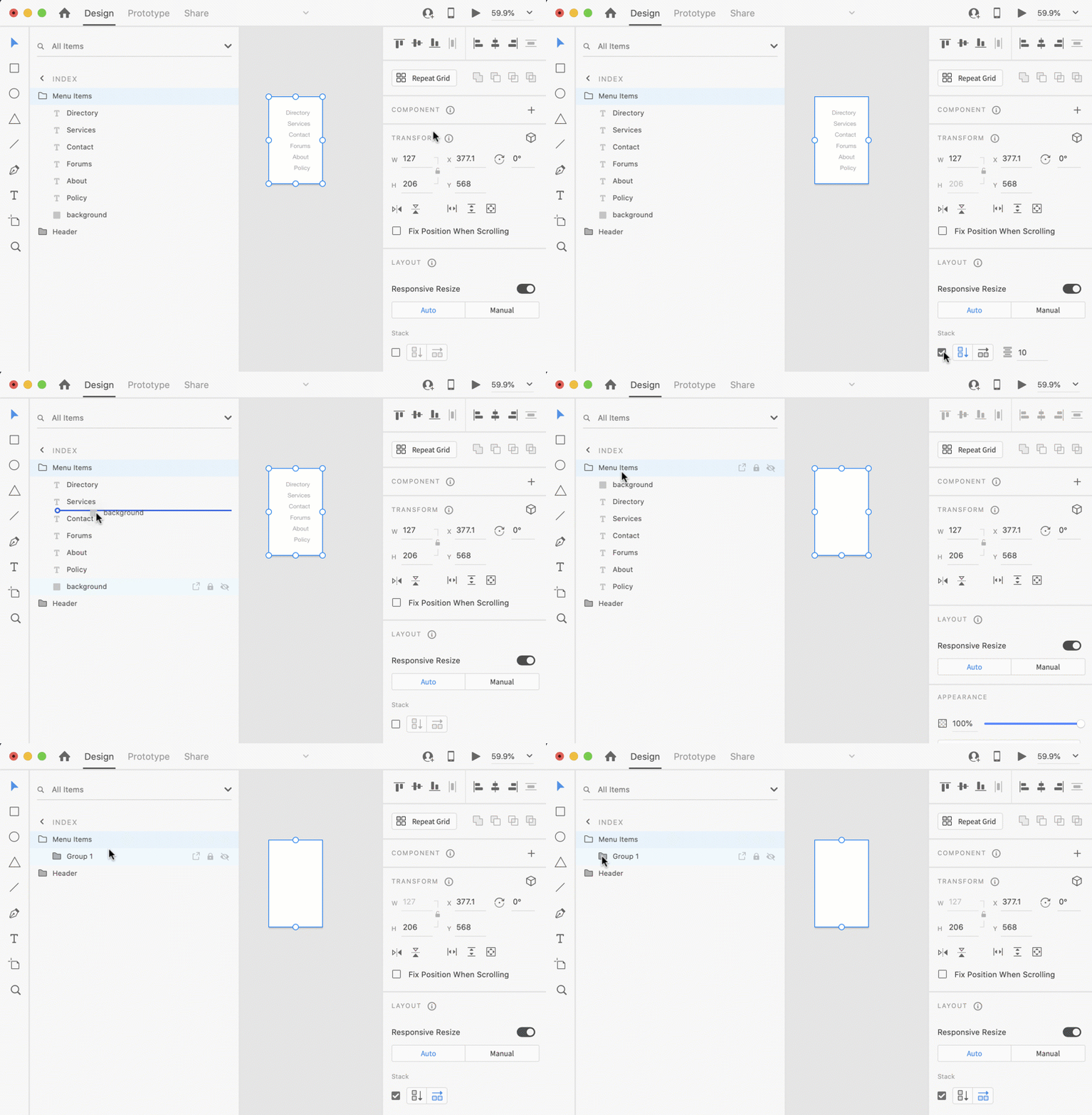
It doesn't always happen but in some conditions (as shown).

Is there a way to prevent this?

How do I know how this is determined? 

This topic has been closed for replies.

2 replies

Spas K.
Community Expert
Community Expert
September 28, 2021

It's inconsistent behavior, and could be reported as a bug, but generally you aren't supposed to use stacks like that anyway. You shouldn't stack objects that are overlapping. Your menu items should be in a stack group, and the background should be separate.


This is the setup you should use instead, if you want the background to be responsive to menu changes:


Here's the file.

I've attached a video below as well.

thx1138Author
Inspiring
September 29, 2021

I'm going to push back on this because of the "newish" background feature. 


Go ahead all the text elements and a non-white rectangle and put them in a group. Make sure to avoid this bug mentioned. Then right click on the background in the layers panel and select "Make background". 


The background is now and must be part of the same group as the text elements for this feature to work. Then click the Stack option. Optionally, add padding. 


For some reason, I hadn't heard of this feature but happened to stumble upon it. 

HARSHIKA_VERMA
Community Manager
Community Manager
August 18, 2021

Hi there,


Thank you for reaching out and sorry for the trouble using stack feature in XD. I am unable to reproduce the issue at my end on my windows machine. Could you please share the XD and the OS version of your machine?


  • How frequently does that happen?
  • Are you able to reproduce the bug always?
  • Does that happen with every file?


We will try our best to investigate the issue.


Thanks,

Harshika


thx1138Author
Inspiring
August 19, 2021

Hi,  


  • How frequently does that happen? Every time in certain conditions
  • Are you able to reproduce the bug always? Yes
  • Does that happen with every file? Yes


I've added a video with steps to reproduce.


OSX 10.15.7

Adobe XD 39.0.11.10

Adobe XD 42.0.22.11

HARSHIKA_VERMA
Community Manager
Community Manager
September 7, 2021

Thanks for sharing the video. Are you still experiencing the issue with XD 43 version? If yes, please share the XD file with me over a private message. You may upload the file to a shared location such as Dropbox and share the URL with me.


I will try my best to investigate.


Thanks,

Harshika