
Participant
July 17, 2020
Answered

When I change file name and update prototype link, the title tag doesn't change

  • July 17, 2020
  • 1 reply
  • 1382 views

When I change the file name in XD, update the prototype link, then go look at the prototype, the title of the page is still the same as the original name of the file. This causes a problem as we refine the files and things change. Anyone know how to fix this short of creating new files and new links?
    This topic has been closed for replies.
    Correct answer Harshika Verma

    Hi Jessica,


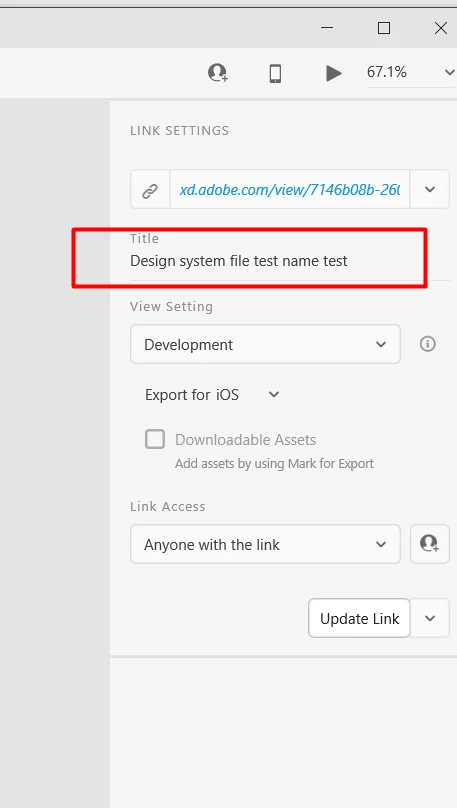
    Thank you for reaching out and using Adobe XD. XD doesn't change the name of the file dynamically. You'll have to change the name of your existing prototype manually in Share mode. Try with a new link or update the link by changing the name manually from the location attached in the screenshot below and see if that helps.


    Hope it helps. 


    Thanks,

    Harshika

    1 reply

    Harshika Verma
    Community Manager
    Harshika VermaCommunity ManagerCorrect answer
    Community Manager
    July 17, 2020

    Hi Jessica,


    Thank you for reaching out and using Adobe XD. XD doesn't change the name of the file dynamically. You'll have to change the name of your existing prototype manually in Share mode. Try with a new link or update the link by changing the name manually from the location attached in the screenshot below and see if that helps.


    Hope it helps. 


    Thanks,

    Harshika