

Where are Edit, Delete and Resolve icons in commenting panel? Enter key does not submit comments
Where are the edit and delete options for comments?
To achieve consistency in commenting experience across Adobe web surfaces and to enable better accessibility in the panel, there has been a minor change to the user interface for these options. Click the more options icon (...) next to a comment thread to access the Resolve, Edit and Delete options.
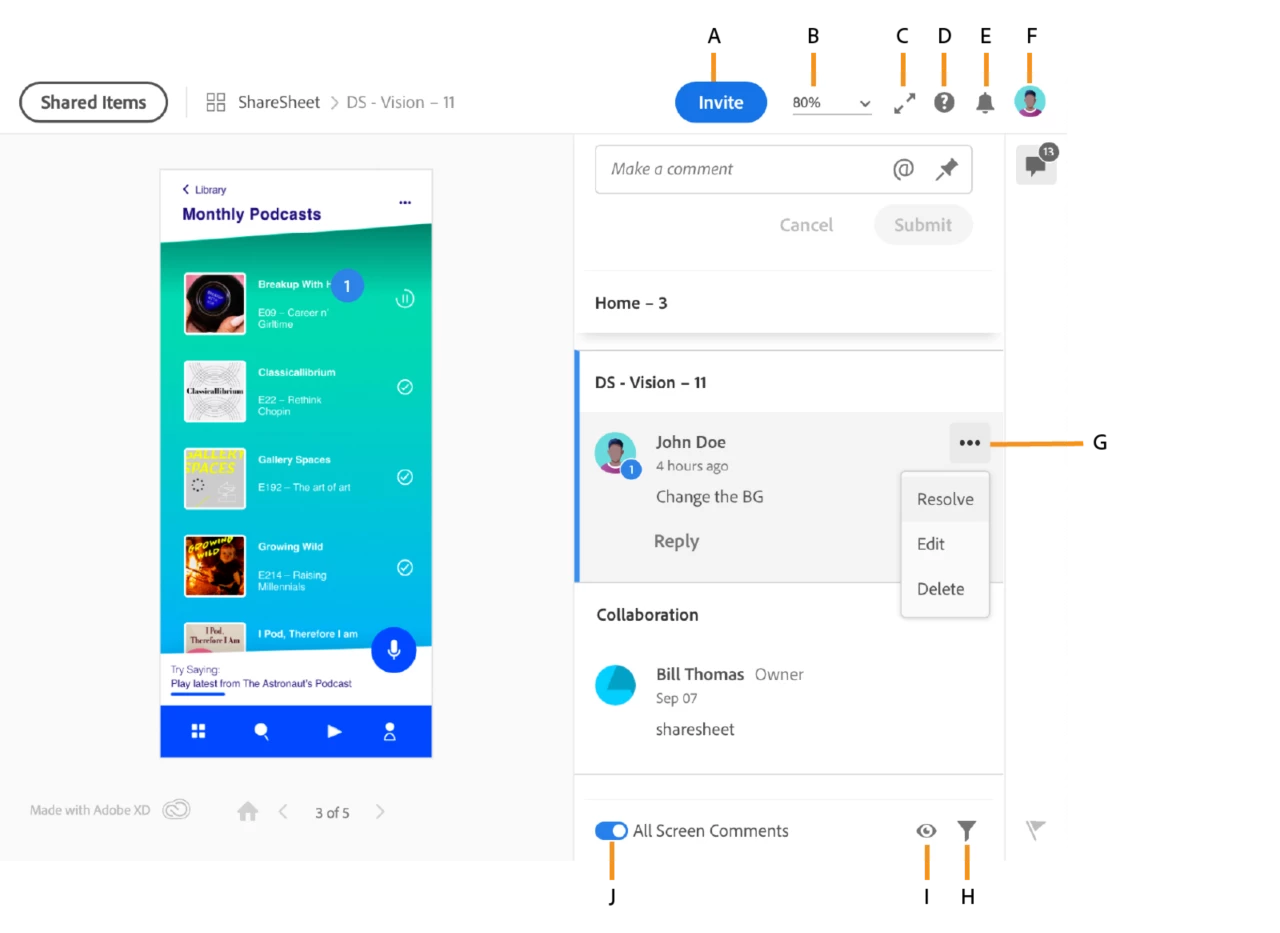
A: Invite options B: Zoom settings C: Full Screen Mode D. Support and Feedback E: Notifications F: User Profile G: Menu options for comments H: Filter comments I: Hide annotations J: All screen comments toggle option
Enter key is creating a new line and NOT submitting my comment!
Pressing the Enter key will create a new line of text for your comment – Use “Enter” or “Shift + Enter” key to create a new line while typing your comment in the edit field. To submit comments, press Ctrl+Enter (Win) or Cmd+Enter (macOS).
Thanks,
Preran


 AdChoices