



Edu Couchez
Inspiring
May 5, 2021
Question

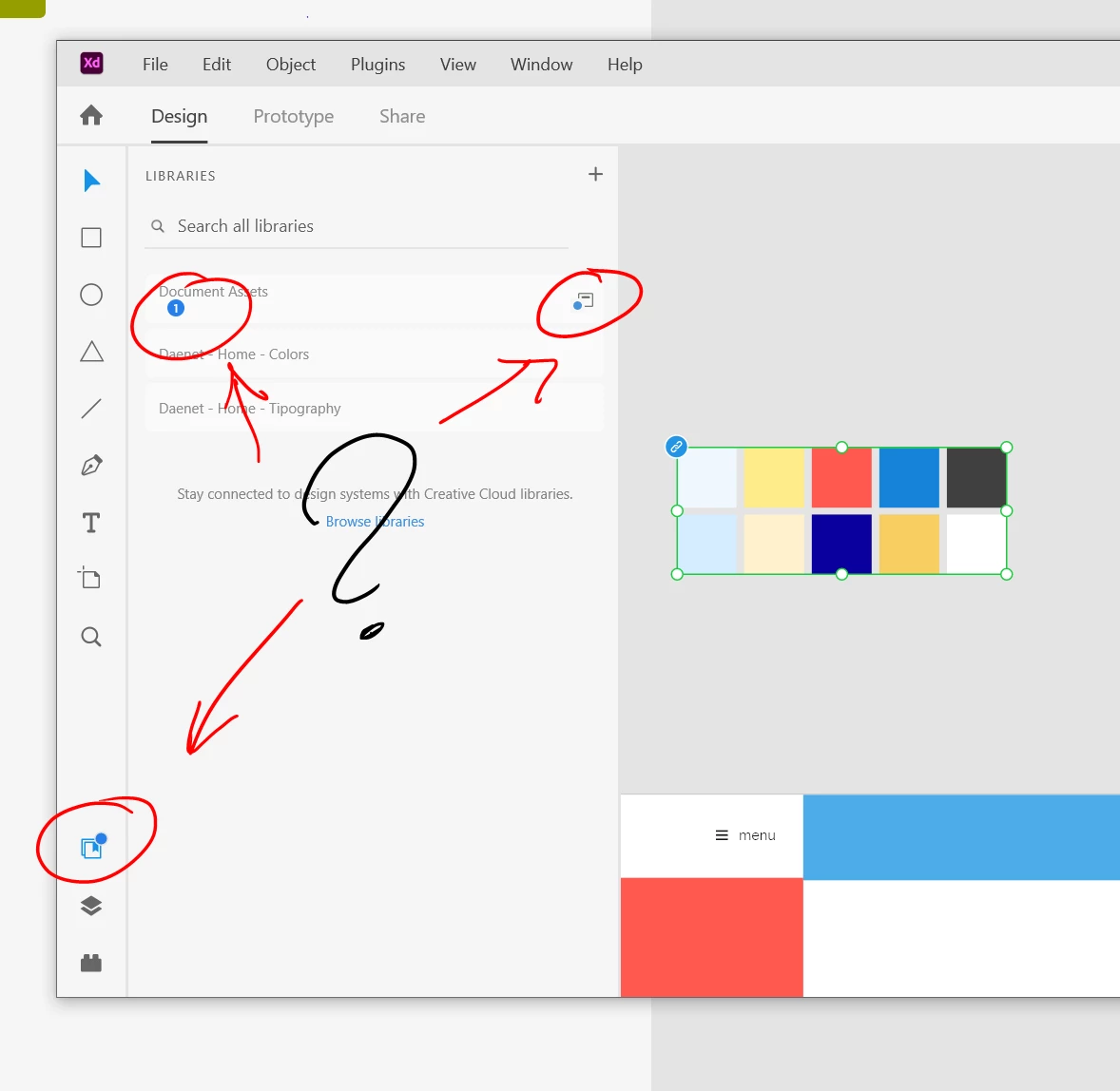
where is the update button for libraries?!!!

  • May 5, 2021
  • 1 reply
  • 509 views

Yet another of these ironical UX flaws on XD. Just I've updated a linked file published as library... then, the file says that something has changed outside. But how I can update these changes without any kind of button? I've been all the day dealing with XD issues... can't use more my brain any more to think alternative mental models as yours.
This topic has been closed for replies.

1 reply

Dan Rodney
Community Expert
Community Expert
May 5, 2021

Click on the Document Assets library and then at the bottom of the Libraries panel there should be an Update button. You will also be able to hover over any blue links to preview the change and then click the blue link to update that specific component.

Adobe Certified Expert & Instructor at Noble Desktop | Web Developer, Designer, InDesign Scriptor
Edu Couchez
Inspiring
May 6, 2021

Nothing... I give up. I'm investing almost the 80% of my daily work to deal with usability issues. Clicking after clicking, jumping back and forth between layers and library tabs, no button at the bottom, no feedback or visual cues... suppose that XD usability and user interface has been designed with XD itself.