Participant
December 4, 2019
Answered

While updating the share link in XD getting error "You're disconnected".

  • December 4, 2019
  • 8 replies
  • 8772 views

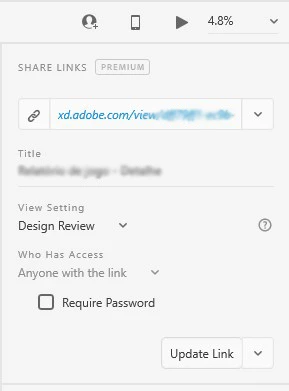
In some XD files, when I try to update share links, I get the error "You're disconnected. Check your internet connection and try again".

But I have internet connection an I can update other files.

Usually, file links stop updating when I add too many prototyping interations. Then, even if I undo them, the won't work again.


Does somebody had this problem?


Thanks,

Emanuel Saramago


<The Title was renamed by moderator>

Correct answer chen yanis

i am being having the same issue where i connect my laptop to the internet conection 3 times and still give the same error.

Laptop OS is windows 10

8 replies

chen yanisCorrect answer
Participant
July 2, 2023

i am being having the same issue where i connect my laptop to the internet conection 3 times and still give the same error.

Laptop OS is windows 10

Karthik Rajendran
Participant
May 31, 2023

I am facing the same issue 😞

Participant
March 27, 2023

Hi Adobe Team
I have exactly the same problem while trying to update a link I have created with XD in my Work network.

In my workflow I:

1) Open a new file.

2) Share it to my colleagues.

3) After several minutes while trying to update the link with a newer version (after working on the same file) i receive the Error Message "You're disconnected. Check your internet connection and try again".

4) Now I have to turn down my computer and restart it an then open the file and generate a new link.......

This workflow is ANNOYING because I have to resend everybody the new link and collect all the reviews they wrote to me from all the history links!!!

Our Network administrator can't find any block to access ADOBE servers

Can you please help us solve this issue?
Can I send you any log files….

Thanks

Beni 

Participant
May 12, 2022

Same issue in 2022 ???!!!

hifoo82
Participant
July 13, 2022

Yeah, this is still an issue. I have tried everything in this thread. Even files I have created links in the past are now unable to make updated/new links. Uninstall and reinstalled the latest version of XD. Nothing seems to fix this. 


Participant
July 13, 2022

It is necessary to have a strong internet connection in order to update or create a new link!!

Participant
August 31, 2021

I'm having this issue now too. I've tried all of the steps mentioned in this thread, including more, and still cannot share my files.

blake_blake_
Participant
June 3, 2021

I'm getting the same issue and have done all the requested steps. Tried multiple internet lines, ethernet and wifi. Creating a new file seems counter productive to those that already have their files in use by their development team. All I'm trying to do is update an existing file.

HARSHIKA_VERMA
Community Manager
Community Manager
June 6, 2021

Hi Blake, 


Sorry for the trouble. Would you mind sharing the screenshot of your about XD info page? Are you working in an enterprise network?


We will try our best to help.


Thanks,

Harshika

Participant
August 3, 2021

Hi,


I am also encountering this problem. I work in a company network.

Participant
May 5, 2021

Same issue in 2021 (05.05.2021). On 97% and 99% getting same message and can not share my artboards.

Participant
May 7, 2021

Same issue is with me. I am unable to update the link.
Error showing

Version: 39.0.12.12 

HARSHIKA_VERMA
Community Manager
Community Manager
May 14, 2021

Hi Muhammad,


Sorry for the delay in response. Are you still experiencing the issue with XD 40 version? If yes, please try copying the content of this file from prototype mode into a new file and see if that helps.


We'll try our best to help.


Thanks,

Harshika

Community Manager
December 5, 2019

Hi Emanuel,

We are sorry to hear that you are facing issues while updating existing links. It would help us if you provide more details on network connection.

1. Do you connect your system via Ethernet/ Wi-Fi? 

2. Office or Home network?

3. Bandwidth details?

4. Application idle time between create link and update link?


Thanks,

Muthukumar S

Participating Frequently
December 5, 2019

Hello!

I'm trying to update links in the office, connected via Wi-Fi.

The bandwidth is very good.

I don't see a pattern in idle time between create link and update link. Sometimes it take days, some times it takes just a while.

I've tried to rebuild a prototype based on another that doesn't update. At first, it was fine, but after creating half of the transitions, it stopped working.


This is an example of how I'm updating the links of two files at the same time and, one works, but the other doesn't.

I've tried 3 times, with the same result.


Thanks,

Emanuel Saramago

HARSHIKA_VERMA
Community Manager
Community Manager
December 5, 2019

Hi Emanuel,


We are sorry to hear you are facing trouble updating the share link in XD.Thank you for sharing the information asked by Muthukumar. We would also like to know a few more details in order to investigate about the issue.


  • What is the OS & XD version of your machine?
  • Does this happen with a specific file? If yes, please share the file with us over a private message.
  • Have you tried signing out of XD and Creative Cloud and sign back in?


If that doesn't help, please generate the log files using this link: https://helpx.adobe.com/in/creative-cloud/kb/cc-log-collector.html and upload the file to a shared location such as Creative Cloud & share the url with me over a private message.


We will try our best to help.


Thanks,

Harshika