Inspiring
December 14, 2020
解決済み

Why do Character Styles no Longer Show the Name in the Preview?

  • December 14, 2020
  • 返信数 1.
  • 550 ビュー

Mac OSX (Big Sur)

XDVersion 35.2.12


This has been an issue for me for several versions now, but I have a bunch of master text styles I use across multiple documents. Im not sure which update caused it, but the preview of the character style USED TO show the NAME of the style, making it easy to quickly identify and choose one.


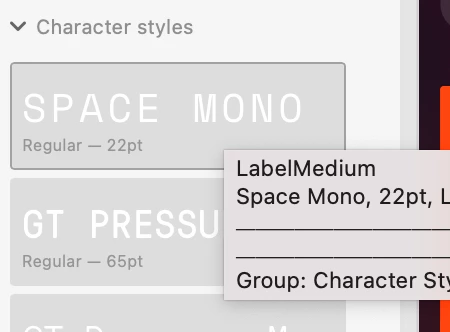
Now, not sure if this a bug or not, but it simply shows the name of the font being used. So if I have 5 variants of the same font, i essentially see 5 of the same character style until I hover over each where the name lives in a tooltip popup.


I sincerely hope this is not the intended behavior because it is a serious regression in functionality that has needlessly slowed down my workflow.


See photo below (font is SPACE MONO, character style name is LabelMedium)
 

    このトピックへの返信は締め切られました。
    解決に役立った回答 Atul_Saini

    Hi Jordanm,


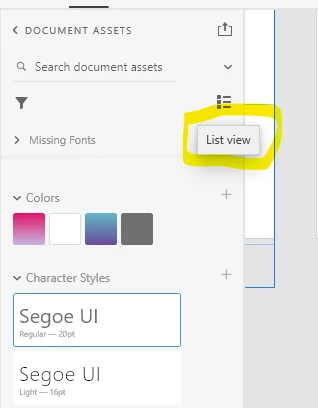
     Thank you for reaching out, this appears to be the grid view. Please switch it to List view as shown in the screenshot and check if that helps. 


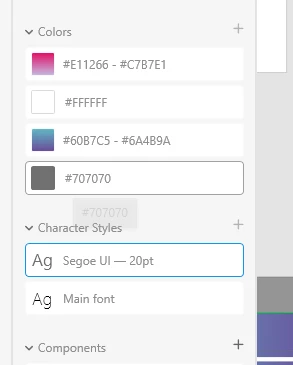
    In the List view, the name of the character style appears in the panel. 


    Please let me know if this helps. We'll be happy to help further if the issue persists. 


    Thanks,

    Atul_Saini


    返信数 1

    Atul_Saini
    Atul_Saini解決!
    Legend
    December 16, 2020

    Hi Jordanm,


     Thank you for reaching out, this appears to be the grid view. Please switch it to List view as shown in the screenshot and check if that helps. 


    In the List view, the name of the character style appears in the panel. 


    Please let me know if this helps. We'll be happy to help further if the issue persists. 


    Thanks,

    Atul_Saini