


Question
Why the color preview does no longer show the opacity of the color in the document assets panel?
I have defined e.g. the greyscale palette with the opacities in the assets in the Design system:
- #000000, 87%
- #000000, 60%
- #000000, 12%
- #000000, 8%
- #000000, 4%
- etc
Earlier the preview of the color did show the opacity of the color in the Assets panel and you were able to see what you get also by looking at the color preview. Now in version 57, the asset color preview no longer shows the opacities, and as the result of this change the only way to see the differences between the color assets is to name them accordingly. This is a change for the worse.
See the image below for the problem — the asset color preview looks the same for all different shades of black.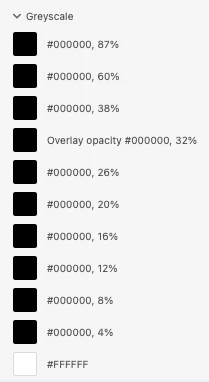
Will you fix the color assets to show the opacities in the color preview (as it used do)?
 AdChoices