
Participant
December 6, 2017
Answered

"Windows cannot find 'powershell.exe'." Error

  • December 6, 2017
  • 2 replies
  • 20139 views

Used to have Adobe XD installed on my Windows 10 PC for the past few months until I had to use it again, and realized I couldn't find it in the task bar or start menu.

Upon opening Creative Cloud app, it says "install" rather than open, meaning it was removed without my knowledge and I had to redownload it.

The main issue comes from being unable to update or install it because of the screencapped error below.

Any ideas of how to fix this?
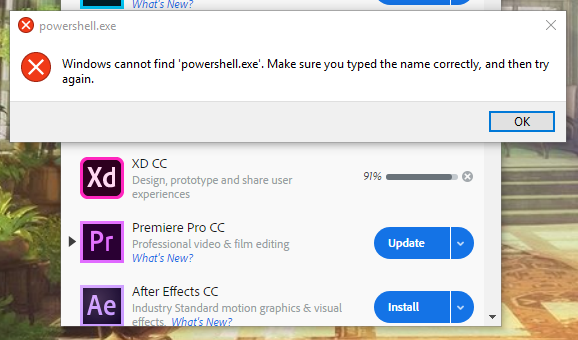
This topic has been closed for replies.
Correct answer prakashc10742878

Way To Delete Powershell.exe Virus Completely From Windows PC

About Powershell.exe Powershell.exe is a new and very harmful compute virus detected as Trojan. It is one such very devastating computer virus which can compromise your system severely. Well, it has been programmed the professional cyber criminals and mostly target Windows OS based computers.

2 replies

prakashc10742878Correct answer
Participant
November 22, 2018

Way To Delete Powershell.exe Virus Completely From Windows PC

About Powershell.exe Powershell.exe is a new and very harmful compute virus detected as Trojan. It is one such very devastating computer virus which can compromise your system severely. Well, it has been programmed the professional cyber criminals and mostly target Windows OS based computers.

fratila_vlad
Participating Frequently
December 7, 2017

Hi Joshua,

It looks that your Path environment variable is corrupted and doesn't contain the path to powershell.exe.

In order to fix this, follow the steps:

Right click start button -> System -> Advanced system settings -> Environment Variables... -> Select PATH -> Click Edit...

Make sure to have C:\WINDOWS\System32\WindowsPowerShell\v1.0\ among the entries. If you don't have it, add it there.

You should restart the Creative Cloud app before trying to install again, or to be sure, it's better to restart your computer.

Let me know if it fixes your problem,

Vlad

jkline3Author
Participant
December 8, 2017

Hi, thank you for the response! powershell is there, restarted my PC, still have the problem

Participant
July 10, 2021

thanks