

ajn_design
Inspiring
March 13, 2017
Answered

Windows vs Mac

  • March 13, 2017
  • 1 reply
  • 832 views

I know it's Beta but ..

I was wondering if Xd for Windows will ever have Visual buttons or Drop Down Menus?

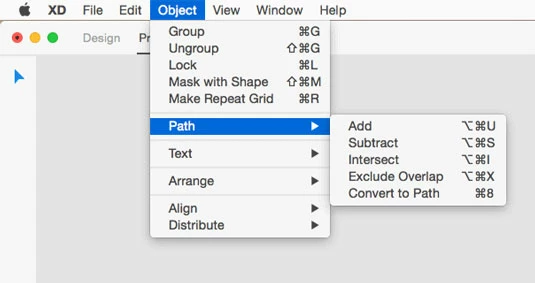
Specially for Path Add, Subtract, Intersect, etc and Mask. The only way to find them is by knowing the Keyboard shortcuts (like Ctrl Alt U for Adding and so forth)

You can find these on the Mac in the dropdown menu AAAANNNDDD on the Path buttons next to the Repeat Grid Button on the right.

Windows just has a Hamburger menu in the left corner with File Menu options only and NO Layers or Symbol Library. Ok, Im switching back to Mac.

You're Killing me !!
This topic has been closed for replies.
Correct answer elainecc

Boolean Group buttons are still on its way in, but it's in active development: [Windows] Boolean groups – Adobe XD Feedback : Feature Requests & Bugs  Upvote in order to get updates as to when it's available in the build.

Regarding the menu bar across the top, that isn't a UWP design pattern. Instead, try right-clicking to launch the context menu when you have something selected; the keyboard shortcuts for available and applicable commands will show up then.

Hope that helps!

-Elaine

1 reply

elainecc
elaineccCorrect answer
Participating Frequently
March 14, 2017

Boolean Group buttons are still on its way in, but it's in active development: [Windows] Boolean groups – Adobe XD Feedback : Feature Requests & Bugs  Upvote in order to get updates as to when it's available in the build.

Regarding the menu bar across the top, that isn't a UWP design pattern. Instead, try right-clicking to launch the context menu when you have something selected; the keyboard shortcuts for available and applicable commands will show up then.

Hope that helps!

-Elaine