
Inspiring
December 29, 2020
Question

wrong color is picked when using eye-dropper from saved colors

  • December 29, 2020
  • 4 replies
  • 653 views

This is the latest in a never-ending stream of work destroying bugs that Adobe XD appears to excel at.

Here's the process:

• Right-click on a character style

• Select edit

• Use the eye-dropper tool to select a color from the assets thumbnail swatches. (why my saved colors are not directly accessible from the character styles edit menu is beyond me and raises numerous questions about the whole XD interface but that's another matter...)

• My character style now has a colour that doesn't match what I just selected.


As an example, if I use the eye-dropper to select from a saved color which is #547474, my text style becomes #4A696F. What is going on here?? It's beyond belief. The worst part is that you don't necessarily notice that the wrong color was applied.

here's a screen grab depicting what I described:
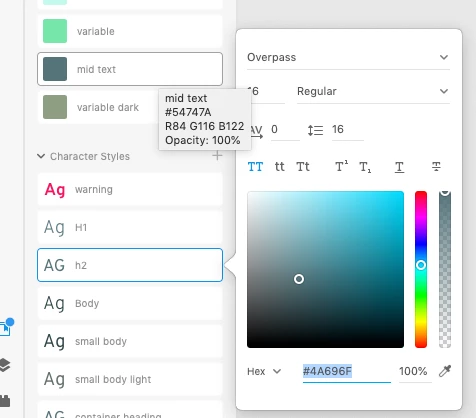
as you can see, "mid text" is defined as #547474 yet h2 edit menu displays it as #4A696F


THIS HAS THE POTENTIAL TO COMPLETELY DESTROY A CAREFULLY CRAFTED DESIGN SYSTEM AND IT IS NOT ACCEPTABLE.


    This topic has been closed for replies.

    4 replies

    orionalden2
    Participant
    December 21, 2022

    The Issue is likely your color profile settings on your Computer. XD does not have its own color profile and is only compatible with sRGB.

    HARSHIKA_VERMA
    Community Manager
    Community Manager
    December 21, 2022

    Hi @TJMType,


    Thank you for reaching out. It looks like you're experiencing a similar issue mentioned here: https://community.adobe.com/t5/adobe-xd-discussions/color-picker-is-not-working-on-xd-55-macos-ventura/td-p/13326360


    If so, please update to the latest version of Ventura, i.e., Ventura 13.1, and let us know if the issue resolves for you.


    Thanks,

    Harshika

    TJMType
    Participant
    December 21, 2022

    I have this same exact problem every day using Adobe XD, and i agree it is not acceptable. I use a Mackbook Pro with an M1 chip and i have Adobe XD v 55.2.12. Installed. Are they any solutions? the App doesnt even seem to have any settings. Is Adobe still oblivious this huge problem?

    HARSHIKA_VERMA
    Community Manager
    Community Manager
    January 21, 2021

    Hi there,


    It's been a while we haven't heard back from you so thought to follow up with you if the things are sorted for you. Please feel free to update the discussion if you need further assistance from us.


    We would be happy to help.


    Thanks,

    Harshika

    Atul_Saini
    Community Manager
    Community Manager
    January 3, 2021

    Hi Mowglivj,


    Sorry for the trouble, I have tried to replicate it on my end. It works as expected. Would you mind sharing the OS build which you are using at the moment? 


    Thanks, 

    Atul_Saini