


Participant
August 5, 2021
Answered

XD : Error: "Library is missing " when components are updated

  • August 5, 2021
  • 1 reply
  • 1238 views

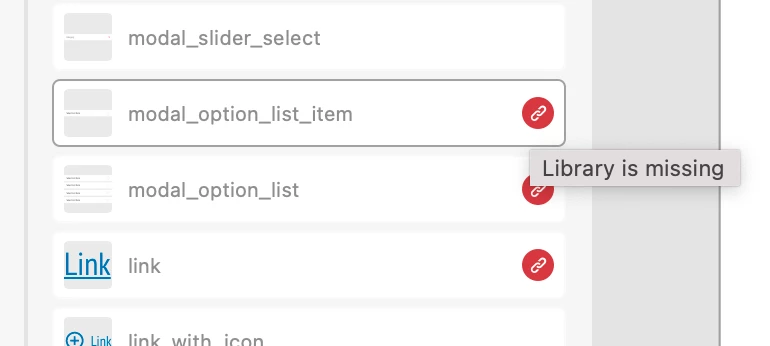
I have an issue where I had an existing library. Then I created a new library and suddenly half of my components in my original library were linked to the new library I created. Even though the new library did not contain any of the first librarys components. I then unpublished the new library. Now I have components that say 'Library is missing'. 


I have about 50 projects that rely on using this library. If I update any components, I will have to go through all projects and fix them individually. That is unacceptable. Please help. 


{Title renamed by MOD}

This topic has been closed for replies.
Correct answer Randy Edmunds 2

How did you create your new library? It sounds like you used Save As... which preserves all of the internal component IDs, so it's a clone of your original library.


The first thing you should do is Re-Publish the library to restore the links.

To create a separate, new library, copy all of the components on canvas and paste them into a new doc. Select the Linked Components in the Assets Panel, right-click > Make Local. Then Publish to a new Library.


Hope this helps,

Randy


1 reply

Randy Edmunds 2
Adobe Employee
Randy Edmunds 2Correct answer
Adobe Employee
August 7, 2021

How did you create your new library? It sounds like you used Save As... which preserves all of the internal component IDs, so it's a clone of your original library.


The first thing you should do is Re-Publish the library to restore the links.

To create a separate, new library, copy all of the components on canvas and paste them into a new doc. Select the Linked Components in the Assets Panel, right-click > Make Local. Then Publish to a new Library.


Hope this helps,

Randy