
XD : How to duplicate a whole project to a new one and also link to a new master asset
\
I encounter an issue during my project.
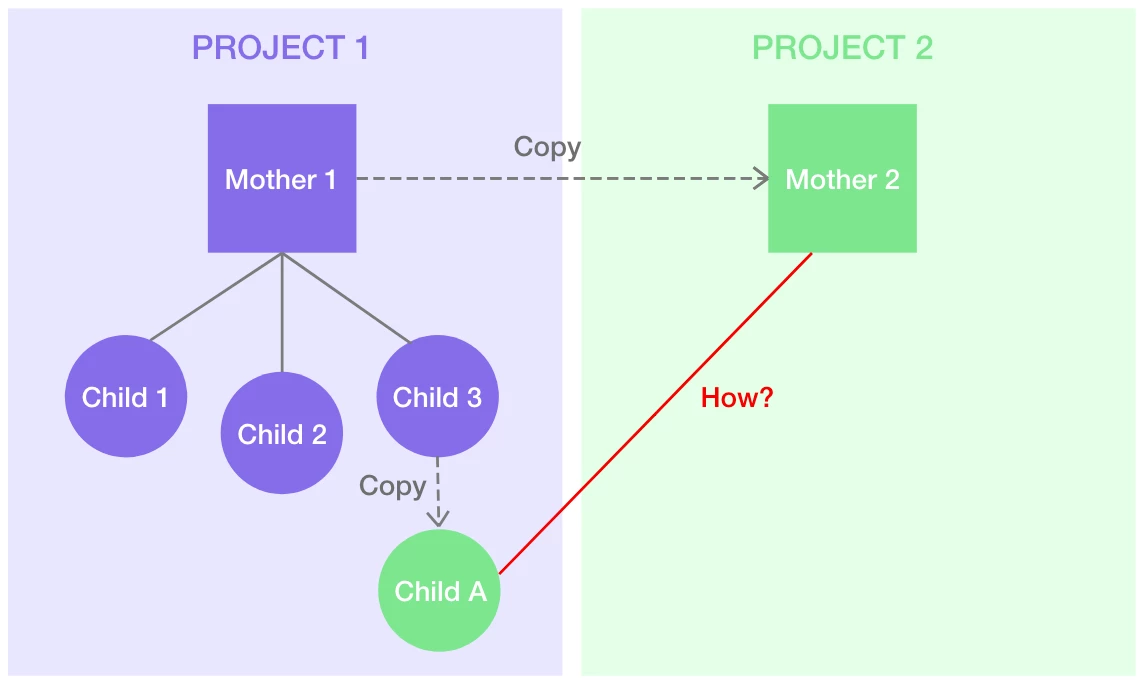
I have a file which is called “Mother 1” (I assume it as a Primitive file) and I created 3 files that link an asset from Mother 1 which is called the “Child” file. (Please see an attached photo of its outline.)
I’d like to create a whole new project by duplicating a “Mother 1” file into a new file called “Mother 2” that I want to link with the "Child A" file (which is created from duplicating “Child 3” file). I want to change only at “Mother 2” and all of there child (In this case is only Child A) can change too.
The problem is how can I do it?
I already tried to duplicate the child and change a link to Mother 2 and nothing changes. And I also tried to group all file in project 1 into a folder in Creative Cloud and duplicated too, but it seems doesn’t work as well.
Would you mind suggesting this problem, please?
Please let me know as soon as possible. Thank you.
PS. If I make anything unclear please ask.
{Title Modified by MOD}


 AdChoices