
brianm45501394
Participant
March 20, 2017
Answered

Xd(mac) unable to update existing prototype link

  • March 20, 2017
  • 9 replies
  • 6670 views

I am unable to update an existing prototype after making design changes. The only option after clicking share again is to create a new link. This does not happen consistently. Sometimes the update link appears and I'm able to update an existing prototype. Other times it appears but is greyed out, and periodically, update link doesn't appear at all. What should I do to consistently have the update link appear enabled when I'm trying to update an existing prototype? The below attachment should have the option for updating, yet it doesn't appear.
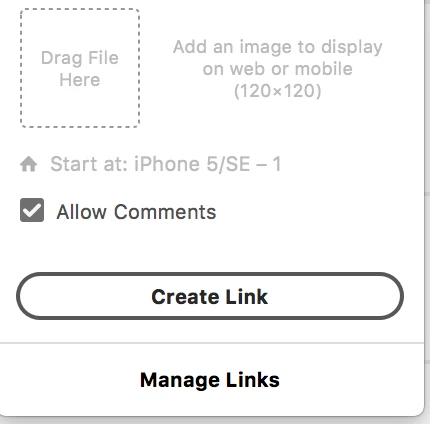
This topic has been closed for replies.
Correct answer elainecc

So for you, it looks like you're on the Windows version of the product. Updating a link will be coming soon! Upvote here: [Windows] Update prototype – Adobe XD Feedback : Feature Requests & Bugs

-Elaine

9 replies

Participant
December 15, 2021

Hi,

Had this issue today and it seems like it was solved by doing a slight namechange of the flow (not the linkname), ex "Flow 1" to "Flow 1.2".

Then when I then hit Update the prototype seem to update like it should.


Hope it can help anyone.

Cheers,

Christopher

Participating Frequently
December 21, 2021

Changing the link name is not for me, only when I share the link with someone else, when I add an email to have access to the prototype, this is actually making the link to be up to date. Please Adobe fix this!

Participating Frequently
December 6, 2021

I think something similar is happening right now with me, when I publish a prototype link any changes I make later is not getting up to date after I click the Update Link button and successfully see all the updating animation finished. Can someone help?

Participant
September 24, 2019

Sharing and Updating does NOT update the prototype.
I have been having this issue for a couple days. I created an interactive prototype and annotated it with comments. I shared that out to team members so that I could gather feedback. Once I made changes to the XD file (saved it) and go to SHARE > Share for Review > Update it shows that it is updating but then when I go to the link after it completes, NONE of the new screens are there. 

Anyone else have a solution to this? The product is useless to me without this feature working. I will switch to Sketch and InVision if need be. Please let me know. 

I do not want to generate new links either... Any thoughts?

Participant
September 24, 2019
Salt Lake City, UT
Participant
August 16, 2019

Hi! Is there another outage on updating links? I'm on Mac and I've been trying to Share > Share for Review > Update Link to publish an updated version of my interaction prototype and nothing is happening. I've even tried creating a new link too already and nothing

Please help.

Thanks!

Preran
Community Manager
Community Manager
August 16, 2019

Can you provide me with info on your location? I haven't heard of an outage, but I can check with the team and get back to you.

Thanks,

Preran

Participant
April 30, 2018

Same issue for me on my Mac. Not sure if it’s a cache issue or what. I saved my project, updated and for me there’s no issue but for the People who had the link already it’s not updated.  Literally had to create saved copies and create a new link every time.  Ridiculous tbh.  

Participant
July 31, 2017

Hey guys,

exactly the same issue here as described in the previous comment. When I want to share the link again, the progress bar just stops at around 3/4 of the circle.

I don't know what to do. Any recommendations?

Looking forward to your support.

Thanks!

David

Corrinna Rainwater
Community Manager
Community Manager
July 31, 2017

Hi David,

there was just another outage, it should be resolved now. Please let us know if it is not resolved for you.

Thanks, Corrinna

Participant
June 28, 2017

If you want to update a link after making changes, click the "Share Online" icon, located at the top right of your window.

You options are "Copy Link" and "Share Again", as well as "Manage Links" below the other two.

This is where a lot of people are overlooking how to update your link. Instead of deleting your previous link and creating a new one, just click the "Share Again" option. From there you can choose either "Update Link" or "New Link", Choose "Update Link".

If you see "Updating shared link", you're good to go!

I hope this helps!

Known Participant
March 29, 2017

Same thing happens to me. I'm constantly having to make new links and resend links to clients, which is goofy. My account just gets filled with adobe xd links now. Even something as simple as swapping out one image, still need to create a new link. http://i.imgur.com/ViJ5UMe.png

elainecc
Community Manager
elaineccCommunity ManagerCorrect answer
Community Manager
March 29, 2017

So for you, it looks like you're on the Windows version of the product. Updating a link will be coming soon! Upvote here: [Windows] Update prototype – Adobe XD Feedback : Feature Requests & Bugs

-Elaine

Corrinna Rainwater
Community Manager
Community Manager
March 20, 2017

Hi,

Are you sure that you always saved your document after you shared? This is necessary to keep the link associated to the file.

If you are sure that you always saved, could you explain a little bit more about the situation? In this case it would be a bug, as the link should never get lost.

Thanks, Corrinna

Participant
May 12, 2017

I've been using XD for 6 months and have been having the same problem and I'm on Mac.  Definitely saved my document after sharing.  There is no ability to update the link.  Have you guys addressed this?