iaing9469063
Participant
June 4, 2018
Answered

XD not Compatible despite OS upto date

  • June 4, 2018
  • 2 replies
  • 563 views

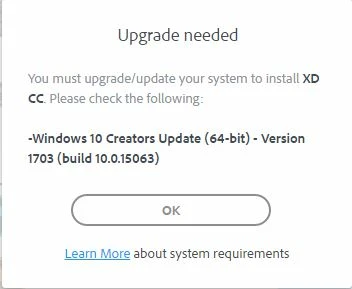
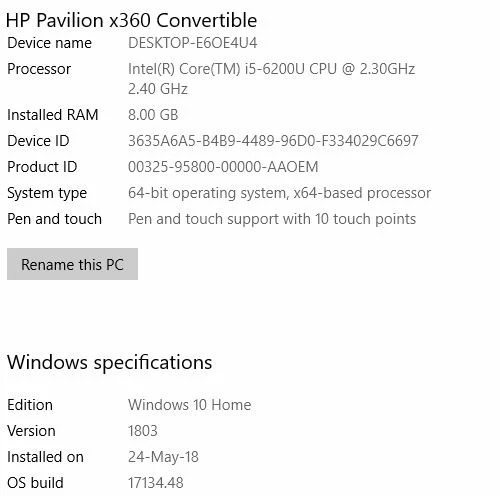
Hi Cant seem to get XD to install despite having an up to date system as required. Tried all suggestions on Forum(s) but to no avail. Anyone have solution?

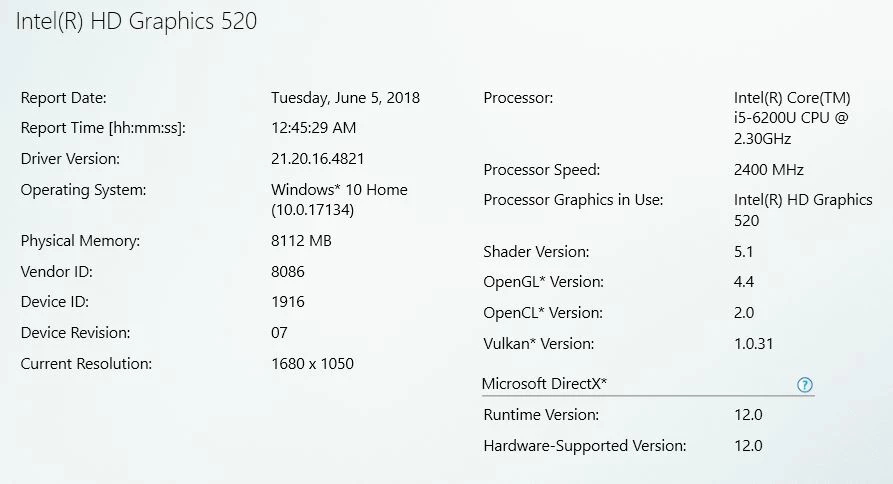
Here is the error and then followed by OS specs

any thoughts appreciated

Iain

    This topic has been closed for replies.
    Correct answer VivekP

    Hi iaing9469063,

    Could you please check if you machine meets other requirements mentioned in Adobe XD System requirements

    If everything looks fine then try following troubleshooting:

    • Navigate to “C:\Program Files (x86)\Adobe\Adobe Creative Cloud\ACC\”
    • Right-click “Creative Cloud.exe” and choose Properties.
    • On the Compatibility tab, deselect the Run this program in compatibility mode for option.
    • Follow the same steps for “Setup.exe” present at “C:\Program Files (x86)\Adobe\Adobe Creative Cloud\HDCore\” and “Adobe Desktop Service” at “C:\Program Files (x86)\Common Files\Adobe\Adobe Desktop Common\ADS”
    • Restart computer and launch the Creative Cloud desktop app

    Please let me know if the issue still persist.

    Regards

    Vivek

    2 replies

    Preran
    Legend
    June 5, 2018

    Hi Iaing,

    Can you try Vivek's solution and let us know if it helped?

    Thanks,

    Preran

    VivekP
    VivekPCorrect answer
    Participating Frequently
    June 5, 2018

    Hi iaing9469063,

    Could you please check if you machine meets other requirements mentioned in Adobe XD System requirements

    If everything looks fine then try following troubleshooting:

    • Navigate to “C:\Program Files (x86)\Adobe\Adobe Creative Cloud\ACC\”
    • Right-click “Creative Cloud.exe” and choose Properties.
    • On the Compatibility tab, deselect the Run this program in compatibility mode for option.
    • Follow the same steps for “Setup.exe” present at “C:\Program Files (x86)\Adobe\Adobe Creative Cloud\HDCore\” and “Adobe Desktop Service” at “C:\Program Files (x86)\Common Files\Adobe\Adobe Desktop Common\ADS”
    • Restart computer and launch the Creative Cloud desktop app

    Please let me know if the issue still persist.

    Regards

    Vivek

    iaing9469063
    Participant
    June 5, 2018

    Hello Vivek

    This worked. The only one that needed the compatibility mode deselecting was

    • C:\Program Files (x86)\Adobe\Adobe Creative Cloud\ACC\Creative Cloud.exe

    The others were already deselected.

    Up and running, great, fair chuffed.

    Many thanks for your help.

    Iain

    VivekP
    Participating Frequently
    June 5, 2018

    Hi iaing9469063,

    I am glad to know that I was able to help.

    Regards,

    Vivek