

Laura Slocum
Participant
July 16, 2021
Answered

XD : Publish as Library button disabled

  • July 16, 2021
  • 1 reply
  • 3023 views

I am trying to create a library so I can use my assets across many projects. However, the button is disabled. I have watched many videos and read documentation around libraries. None of them have a disabled button or talk about how to enable it.



The "Browse Libraries" button is also disabled.
 

Any help would be greatly appreciated!

This topic has been closed for replies.
Correct answer danielo77676218

For anyone experiencing this problem, here's what works for me and the other designers in my team (Windows):


1. Quit Adobe XD.
2. In the Windows search box, type "Powershell", right-click "Powershell and Run as Administrator.
3. Paste in the following command and press Enter:
CheckNetIsolation.exe LoopbackExempt -a -n="Adobe.XD_pc75e8sa7ep4e"
Open Adobe XD again.


If you don't run as administrator, it probably won't work.

1 reply

Community Manager
July 19, 2021

Hello Laura,


Thank you for reporting the issue.

Check your CCD once if library syncing is happening or not , you can check under cloud icon on right side of CCD.

Publish as library on Asset Panel is always enable and to enable Publish button in Library Manager, just one asset is enough.


Try : Quit CCD and all adobe products , along with core sync through Task Manager (Win) / Activity Monitor (Mac). And Launch CCD then Xd.

-- Or Restart the machine


If issue continues please provide us

- Xd version

- Machine OS 

- CCD version 


Regards,

Anita Subedi


Laura Slocum
Participant
July 19, 2021

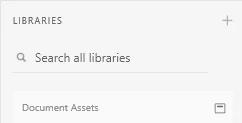
I see this in the assets panel. I assume that's the issue.

I clicked the link and followed the instructions. I followed all the steps and I still have the issue. I even uninstalled all things Adobe and re-installed. It did not help. I am waiting on my IT department to help me uncomment the line in the host file discussed in the 3rd troubleshooting tip step #4.


Community Manager
July 29, 2021

Hello Laura,

Is issue still happening?

Try this workaround once : Sign out from CCD ,Quit CCD and XD and all adobe products, along with core sync through Task Manager (Win) / Activity Monitor (Mac). And Launch CCD , Sign in and then open  Xd.


Regards,

Anita Subedi