
Nazreen exe
Participating Frequently
June 8, 2019
Answered

XD's issue with MacOS Catalina (Can't record prototype preview)

  • June 8, 2019
  • 11 replies
  • 20146 views

Came across a strange issue with Adobe Xd, after I upgraded to MacOS Catalina (developer beta). Xd won't let you record the prototype previews (video in the comment section) not sure whether this has to do with privacy settings etc. for those of you who plan to upgrade, not recommend to do at the moment...

Xd version: 19.2.22.3

MacOS: 10.15 Beta (19A471t)

Video: https://streamable.com/kk0jw
This topic has been closed for replies.
Correct answer Allan R Sturm


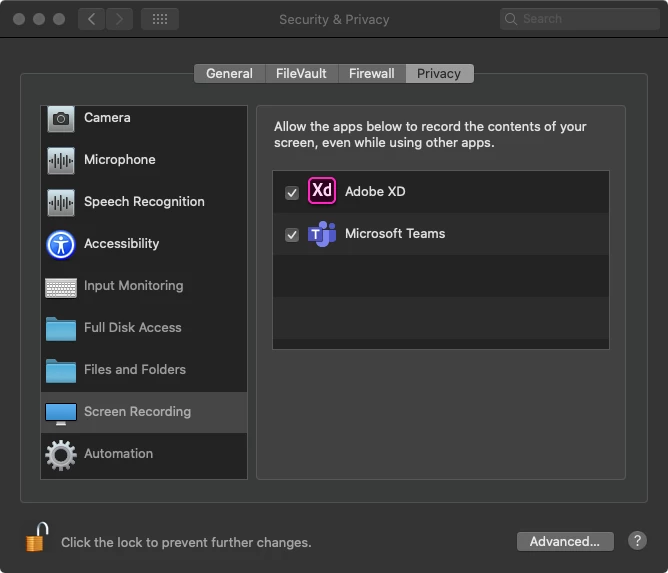
FIX: Unlock the panel, check on Adobe XD and restart the app. 


11 replies

m.brooks42
Participant
July 13, 2020

THANK YOU!

Participant
June 16, 2020

I cannot find the xd at the left list, what can i do??

Participant
May 7, 2020

Thank you!

Participant
March 2, 2020

Hello,  I followed your instruction, however, I couldn't find Adobe XD in my screen recording (see my screenshot below).


Do you have any suggestions to this?


Thanks in advance. 


Participant
April 25, 2020

Unfortunately, I had the same problem

There will be a tiny window in the background where you have to approve to use Adobe XD screenshot.


Paul Mbingu
Participant
December 16, 2019

Thanks, A_Sturm this worked for me.

David Alcala - Adobe
Community Manager
Community Manager
November 22, 2019

There's also now a help document for this:

Unable to record prototype interactions on macOS Catalina (10.15) and later
https://helpx.adobe.com/xd/kb/enable-recording-catalina.html

November 22, 2019

worked for me, thanks!

Allan R SturmCorrect answer
Participant
October 11, 2019


FIX: Unlock the panel, check on Adobe XD and restart the app. 


SkillNation
Known Participant
October 11, 2019

Thanks for sharing the solutions... I've spent 1h of my life trying to find that stupid setting... Apple for sure doing everything to make our lives easier and enjoyable by adding more settings of security&privacy! Great job Apple, burn in hell... 

Participant
October 9, 2019

I had the same issue with the full release of Catalina. I never got the pop up notification to allow Adobe XD to record the screen.

Go to System Preferences > Security & Privacy > Privacy tab > Screen Recording (in left list)

And make sure Adobe XD is ticked in the list

HARSHIKA_VERMA
Community Manager
Community Manager
October 9, 2019

Thanks for sharing the solution that worked for you. This will definitely help our users to fix the issue. Please feel free to reach out to us in the future for any query related to Adobe XD. We would be happy to help.


Thanks,

Harshika

Participant
February 22, 2020

Hi, I have issue with installing XD with Catalina, is it becasue of the incompatible thing?