
Participant
June 10, 2021
Question

XD unit for sizing

  • June 10, 2021
  • 1 reply
  • 868 views

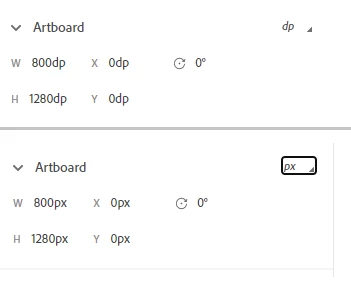
I am designing something for a Samsung galaxy tablet so I used the pre-made artboard for the Galaxy Tab10, but I don't understand how its handling px vs. dp. When I export for development it says that the artboard is 800x1280 dp (which makes sense for an hdpi screen) but also 800x1280 px, which it isn't - the tablet is 1200 by 2000px. So is there any way to show the actual pixels? Why is the developer view showing px, dp and pt as options when it isn't actually distinguishing between them?


This shows what I am seeing in the developer view when I switch between dp and px:
 

{Renamed By MOD}


This topic has been closed for replies.

1 reply

Rishabh_Tiwari
Legend
June 10, 2021

Hi there,


Thanks for reaching out. I found a discussion that may answer your question https://community.adobe.com/t5/adobe-xd/which-unit-does-adobe-xd-use-for-pixel-sizing/m-p/8228778#M129 


Let us know if this helps or if you need any further assistance.


Regards

Rishabh

DhpowersAuthor
Participant
June 10, 2021

This doesn't answer the question at all!

  • I am asking about Android and the suggested answer in that thread only discusses iOS
  • I am using a preset artboard in XD so I don't understand why this issue is built in.
  • There are dozens of other comments in the thread you linked noting that the solution is insufficient


On an HPDI screen such as what I am designing for 1dp = 1.5px. So why is XD allowing a developer to "view" dp, px and pt in a dropdown when it is treating them the same??